Prepare your listing. Organise your first 90 days.
A connected operating workbook and practical guides for preparing an Airbnb accommodation listing and keeping your first stays, costs and next actions in order.
For new or recently launched villa, apartment, cottage and homestay hosts, including small room-based stays.
Payment takes place on Payhip. The final total and applicable taxes are shown there.
1 XLSX + 2 PDFs · One property · Up to five physical units Manual inputs · Desktop-first editing · Google Sheets conversion guidance
Inside the actual workbookSTART HERE
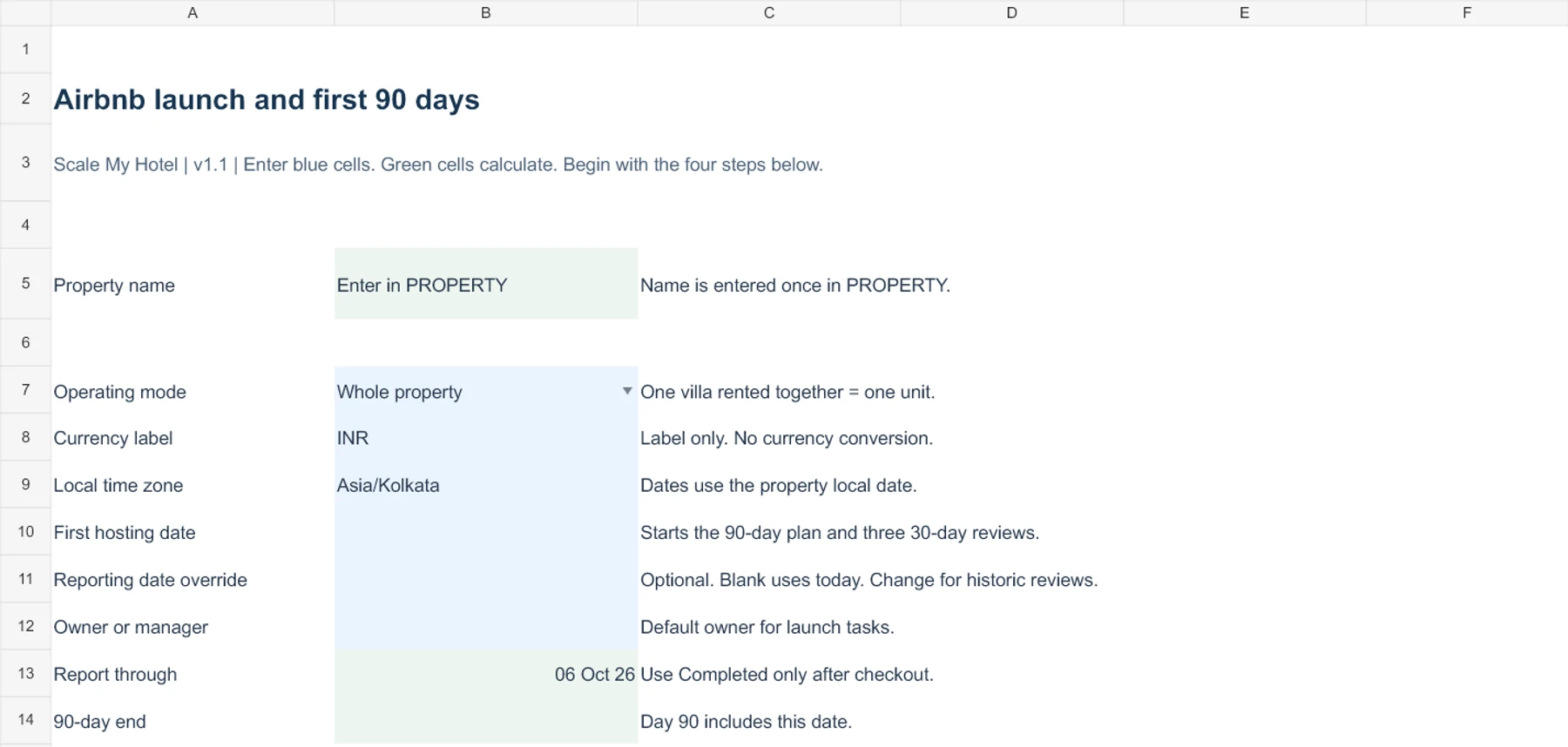
Blank V1.1 template excerpt. Enter property facts once, activate one unit, then choose your next launch checks. Enlarge preview ↗
Make the work easier to follow
From scattered facts to a usable working record
You still do the hosting work. The kit gives your information, checks and follow-through a place to live.
Property facts scattered across chats? Keep approved arrival times, amenities and local support details in PROPERTY, where they feed message drafts and handover.
A listing draft that looks finished? Record what you have actually verified, attach evidence references and keep unanswered content or policy checks open.
A nightly rate without the full costs? Enter your actual fees, stay costs and turnover assumptions before reviewing a Low, Base or High pricing scenario.
“Cleaned” without an inspection? Assign the turnover, record inspection evidence and keep unresolved exceptions visible.
Booking value mistaken for money earned? Separate charges, refunds, payout deductions, cash received and operating costs. A blank cost means unknown, not zero.
One connected workflow
Prepare. Record. Review.
Formulas link the sections inside your private file. You enter the records, verify the decisions and update Airbnb separately.
01
Before launch
Set your property facts, physical units and listing references. Prepare factual copy, photos and policies; complete your cost inputs and assign the 49 launch checks.
Enter each booking once. Booking records feed the workbook calendar, selected guest drafts and turnover details. Assign inspections, print a limited handover, and update repairs and stock manually.
Review completed stays, costs, payout exceptions and observations. Record the evidence, choose a next action, and assign an owner and deadline for follow-through.
REVIEW · Three blocks: days 1–30, 31–60 and 61–90
The calendar is a workbook view of your inputs. It does not synchronise live calendars or prevent double bookings.
See the file you will work in
Actual V1.1 worksheet excerpts
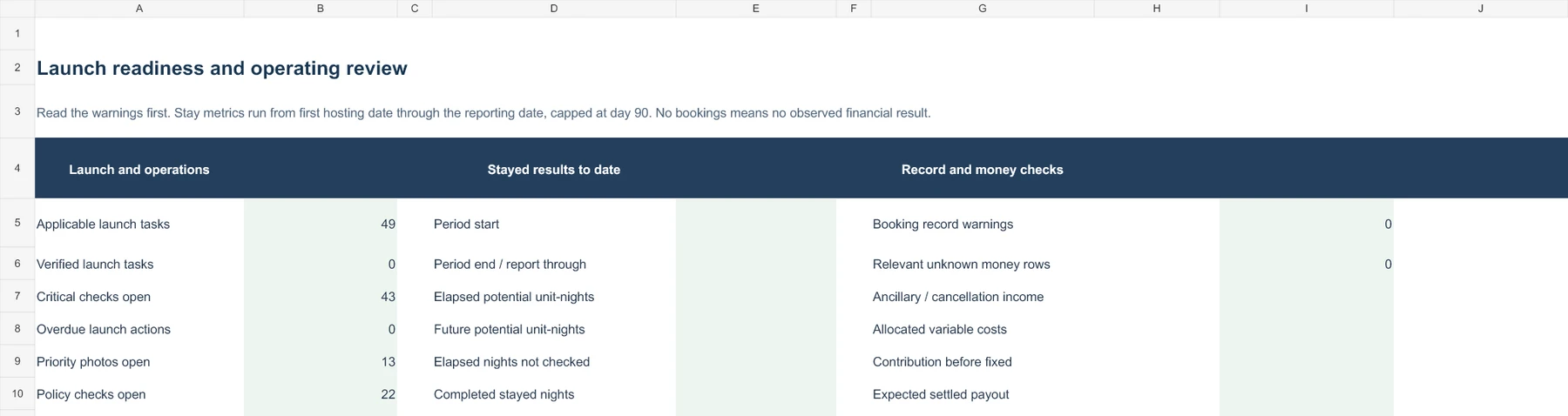
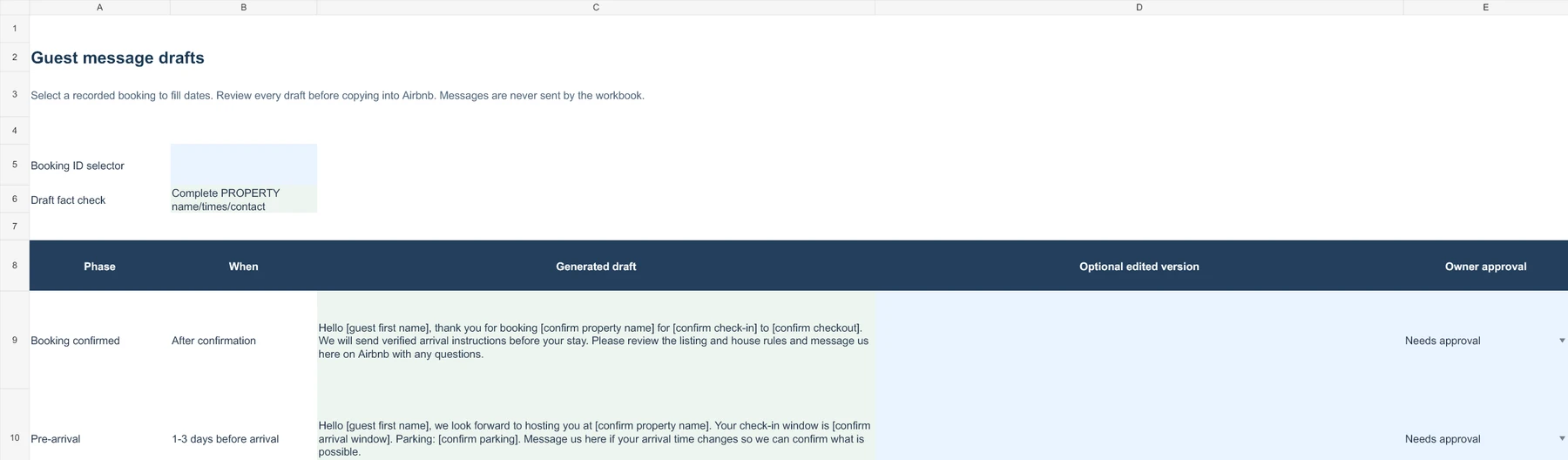
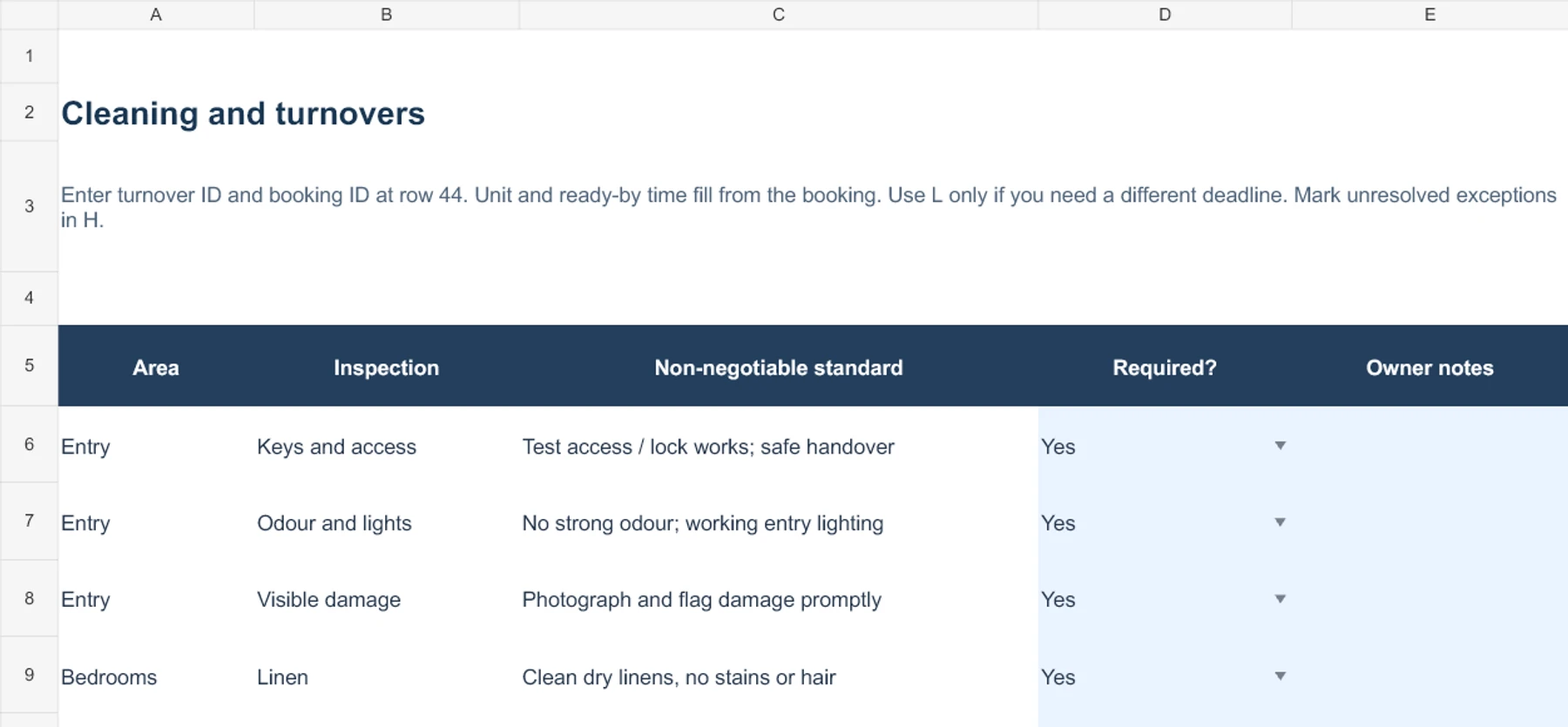
These are cropped blank-template previews, with default checks and draft placeholders. They show no customer outcomes. Open an enlarged image to read the columns.
LAUNCHBlank template excerpt
Give each launch check an owner and evidence
Opening rows of the 49-check Airbnb host checklist. Record a due date, status and confirmation; the workbook keeps unverified work visible.
The first two of ten guest drafts. Shared property facts and an optional booking selector fill the text; brackets and edited versions still need your review.
A few opening inspection checks. Record turnovers further down the sheet, assign the cleaner and inspector, and check readiness before the next arrival.
Three files in one ZIP. The messages, printable handover and worked examples live inside the connected workbook.
Airbnb_Launch_First_90_Days_Kit_v1_1.xlsx
XLSX · 19 tabs
One connected workbook for launch preparation, first stays and 90-day review. Guest-message drafts, printable handover and isolated fictional examples are inside this file.
START_HERE.pdf
PDF · 5 pages
Setup steps, pricing and booking field definitions, operating routines, review logic, Excel/Google Sheets instructions, limits and licence.
CLEANER_BRIEF.pdf
PDF · 1 page
A printable assignment and inspection brief to complete manually and check before sharing with your cleaner.
See all 19 workbook tabs
START HERE
REVIEW
PROPERTY
UNITS
LISTINGS
LAUNCH
CONTENT
PHOTOS
POLICIES
PRICING
BOOKINGS
CALENDAR 90
CLEANING
MAINTENANCE
SUPPLIES
MESSAGES
HANDOVER
EXAMPLES
RESOURCES
EXAMPLES is a fictional practice area isolated from your real records and metrics. It is not a separate example workbook.
Check the fit before purchase
One property, with a clear physical inventory
Use the Airbnb launch kit for one accommodation property you manage: an exclusive villa, apartment, cottage, homestay or a small group of rooms. You need to be willing to enter records, check source information and carry out the actions.
Six bedrooms does not mean six units
A six-bedroom villa rented exclusively to one booking is one sellable unit. Three independently sold Deluxe rooms plus two Standard rooms are five units.
Whole-property and room-level listings can overlap. Mapping warnings help you review the records; correct live calendar controls remain essential.
Working requirements
Desktop Excel or your own converted Google Sheet. The wide booking ledger is desktop-first.
Manual entry of property facts, bookings, costs, inspections and decisions.
Currency is a label only; the workbook does not convert currencies.
Accommodation preparation only. Distinctive stay features do not imply support for Airbnb Experiences or Services.
Managed property
1
Physical units
5
Listing references
8
Bookings
150
Turnovers
150
Photo records
75
Maintenance records
75
Supplies
50
These are supplied record capacities, not a licence for multiple properties. Extending them requires formula and validation testing.
Which Scale My Hotel workbook fits your task?
This Airbnb kit: accommodation listing preparation plus first-stay operations, cleaning, messages and the first 90 days.
Property Launch Operating Kit: broader commercial preparation across planned booking channels, including technology decisions and launch handover.
Hotel Growth Operating Workbook: recurring commercial reviews for operating properties, including channels, pricing, enquiries, direct offers and OTA payouts.
Your first working session
Begin with the guide and one unit
Buy on Payhip
Access the purchased files through the download page and receipt link.
Extract and read
Extract the ZIP and open START_HERE.pdf. Save a private working copy of the XLSX.
Set the foundation
Enter your first hosting date and property facts. Activate U01 with capacity and availability.
Choose the next actions
Filter LAUNCH to critical checks. Choose the next three, assign owners and due dates, then add verification evidence.
In Excel
Open the supplied XLSX in desktop Excel. Blue cells take inputs and green cells calculate. Keep formula cells intact; back up your copy before structural changes.
In Google Sheets
Upload the XLSX to your private Drive, then save it as native Google Sheets. Set the property locale and time zone. Check dates, message substitutions and EXAMPLES results after import; styling and navigation may differ. The guide’s reference results are fictional practice figures, not earnings forecasts.
Downloadable · V1.1
Get the Airbnb Launch Operating Kit
One workbook. Two practical guides. A private working record for your listing preparation and first 90 days.
Payment takes place on Payhip. Review the final total, applicable taxes and Terms of service there before paying.
Your licence
Single-purchaser licence for one managed property. Adapt the kit for that property and share completed guest messages or limited cleaner instructions. Do not resell, redistribute or publish blank masters.
Support and updates
Guides and workbook resources are included. No lifetime updates or personalised consulting are included. For technical file access assistance, contact Scale My Hotel.
Digital-download terms
Refund policy: All sales are final on digital downloads. Because files are delivered immediately upon completed transaction via Payhip, purchases are non-refundable. For access assistance or technical unzipping issues, contact Scale My Hotel with your Payhip order receipt.
A ZIP containing Airbnb_Launch_First_90_Days_Kit_v1_1.xlsx, START_HERE.pdf and CLEANER_BRIEF.pdf. Ten guest-message drafts, printable handover and fictional worked examples are inside the workbook. There are no separate message documents, example workbooks, Canva templates or videos.
Is this for a whole villa or individual rooms?
Both, within one property and five independently sellable physical units. A six-bedroom villa rented exclusively as a whole is one unit. Three Deluxe rooms and two Standard rooms sold separately are five units. Eight listing references are supported; listing counts do not add physical capacity. Overlapping whole-property and room listings require verified live calendar controls.
Does it work in Excel and Google Sheets?
The download is an XLSX workbook. Open it in desktop Excel, or upload it to your own Google Drive and save it as native Google Sheets using the supplied instructions. Set your property locale and time zone, keep sharing restricted, and check date and message substitutions plus the EXAMPLES calculations after conversion. Table styling and navigation can differ. No public Google Sheets template link ships. No macros are required.
Do I need spreadsheet experience?
You should be comfortable typing into input cells, choosing dropdown values and filtering rows. Blue cells take inputs; green cells calculate. Start with one active unit and the guide. Editing formulas or extending record ranges requires spreadsheet knowledge and testing. Desktop-first editing is recommended, especially for the booking ledger.
Does it connect to Airbnb or send messages?
No. You enter records manually. Formulas link sections inside your working file; they do not publish listings, send messages, update live rates, synchronise calendars or prevent double bookings. Review each draft and copy it into Airbnb yourself. Cleaning, repairs and property management remain your responsibility.
What does the 90-day review cover?
Stayed results run from your first hosting date through the reporting date, capped at day 90. The three blocks cover days 1–30, 31–60 and 61–90, not calendar months. REVIEW shows completed nights, net accommodation revenue, occupancy, ADR, costs and contribution when inputs are complete. It also records observations, evidence, next actions, owners and deadlines. Flat booking amounts are allocated evenly across nights; payout balance covers all recorded settled bookings and is not a 90-day cash-flow statement.
Can I use it for several properties?
The shipped licence is for a single purchaser and one managed property. The workbook supports one property. Contact Scale My Hotel before buying for multiple-property or other licensing needs; extra licences or entitlements are not included in this offer.
Can I edit or extend the workbook?
You may adapt it for your licensed property. Save a backup before changing formulas. Keep U01–U05 and L01–L08 as reference IDs. Extending capacity requires formula and validation testing and is outside the supplied limits. Do not resell, redistribute or publish blank masters; share only completed guest messages or limited cleaner instructions.
What support and updates are included?
The kit includes the practical guides and in-workbook resources. The shipped guide directs questions to Scale My Hotel; no personalised consulting or lifetime updates are included. A support response time and future-update schedule are not specified. Ask about any additional support you need before purchase.
How do downloads and refunds work?
Payment and purchase access take place on Payhip. After purchase, use the download page and receipt link to access your files, extract the ZIP, and begin with START_HERE.pdf. All sales are final on digital downloads; because files are delivered immediately upon completed transaction via Payhip, purchases are non-refundable. For access assistance or technical unzipping issues, contact Scale My Hotel with your Payhip order reference.
Does it guarantee approval, bookings or compliance?
No. It is a self-service preparation and operating aid. Eligibility, hosting permissions, safety, insurance, taxes and registrations need current checks with the appropriate platform and local professionals. Pricing outputs are owner-reviewed scenarios, not forecasts. Contribution depends on the costs entered and is not accounting profit. Distinctive accommodation features can inform listing copy; this kit does not cover launching Airbnb Experiences or Services.
Every kit is a self-service, one-time digital purchase built around practical spreadsheets and operational guides. Choose the right tool for your property stage and channel scope.
13-worksheet connected workbook (.xlsx) + 2-page Start Here PDF + Licence & support guide PDF
Need help choosing? For an operating property conducting monthly commercial reviews, choose the Hotel Growth Operating Workbook. For preparing an upcoming property opening across all channels, choose the Property Launch Operating Kit. For focused setup on a single platform, select the dedicated channel kit (Booking.com, MakeMyTrip, Airbnb, or Expedia).
Prepare your listing. Organise your first 90 days.
AIRBNB LAUNCH OPERATING KIT · V1.1 · ₹999 INR once
Independent Scale My Hotel product. Not endorsed by or affiliated with Airbnb.