Keep property facts connected
Enter owner-approved property information once. Linked content cues and core policy checks reuse the relevant facts.
PROPERTY MASTER · LISTING CONTENT · POLICY CHECK
Independent Excel workbook · Version 1.1
Prepare your listing.
Organise your first 90 days.
Bring property facts, room or villa inventory, rates, photos, policies and launch checks into one connected workbook. Prepare accurately, check what is published and build a repeatable operating routine.
For independent hotels, boutique stays, resorts, guesthouses, villas, homestays and serviced apartments preparing or reviewing a MakeMyTrip listing.
₹999INR · one-time purchase
Get the MakeMyTrip Operating KitPublic Payhip price checked 10 October 2026. Confirm the final total and applicable terms at checkout. Read purchase information.
See what’s insideXLSX + 2 PDFs + TXT · Computer recommended · Software compatibility notes
Independent toolkit by Scale My Hotel. Not affiliated with or endorsed by MakeMyTrip or Goibibo. Listing approval, eligibility and account operations remain subject to MakeMyTrip’s requirements.
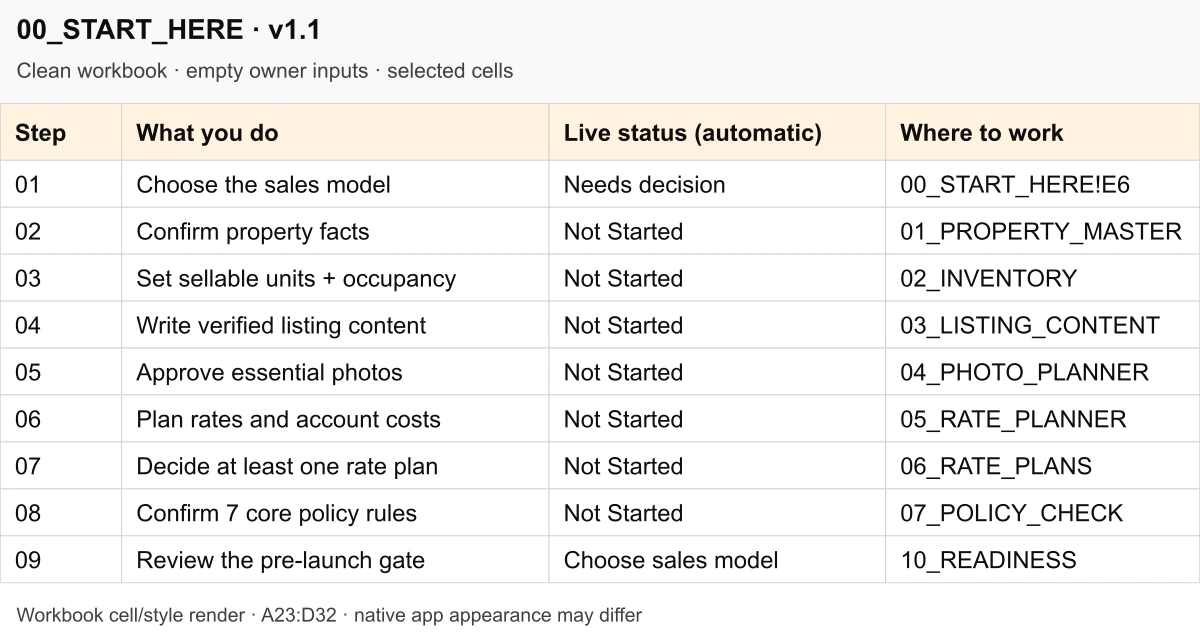
Rendered from delivered v1.1 cells and formatting; empty owner inputs. Native app appearance may differ.
The work around onboarding
Physical bedrooms can be confused with bookable units. Occupancy and house rules can disagree. Content, photos and rates can sit in disconnected notes. Once the listing is active, it can be unclear what to inspect and who should fix it.
MakeMyTrip’s free official registration remains available without buying this kit. You pay for an organised working record around onboarding: reusable facts, connected decisions, consistency checks and follow-through after launch. You still configure the platform yourself.
The MakeMyTrip Launch Operating Kit is an independent Excel-based preparation and operating toolkit developed by Scale My Hotel for hotel, villa and homestay owners planning or managing a MakeMyTrip listing.
Enter owner-approved property information once. Linked content cues and core policy checks reuse the relevant facts.
PROPERTY MASTER · LISTING CONTENT · POLICY CHECK
Separate physical bedrooms from sellable units and guest capacity. Review inconsistent occupancy, duplicate active names and whole-property warnings.
INVENTORY
Verify seven core copy blocks and choose relevant photo shots. Optional amenities are not treated as universal platform requirements.
LISTING CONTENT · PHOTO PLANNER
Inventory names and base adults feed the rate planner. Enter your rates, discounts and actual OTA cost assumptions, then review estimated net and warning flags.
RATE PLANNER · RATE PLANS
Seven core areas drive internal readiness. Benchmarking and technology decisions are optional; published-listing QA happens after activation.
READINESS · LIVE QA
Use daily, weekly and periodic checks, a 90-day action plan, manual performance measures and an issue log with owners and resolutions.
OPS CHECKLIST · 90 DAY PLAN · PERFORMANCE · ISSUE LOG
Count what can be booked independently
The booking model comes first. The workbook distinguishes Room / Unit Based, Whole Property, Hybrid / Multiple Configurations and Unsure.
6 bedrooms → 1 whole villa → 1 unit
One group books the entire property. The six bedrooms describe the villa; they do not create six independently sellable units. The included fictional villa sheet demonstrates this distinction.
6 separate rooms → 6 units
Each room can be reserved separately, subject to the actual room-category setup. Enter real quantities and guest limits, then check the live platform configuration.
Conceptual comparison only; not a platform eligibility decision.
Hybrid models need care. Choosing Hybrid records your model; it does not coordinate overlapping calendars. Resolve whole-property and room-level conflicts in suitable operating software before activation. The kit cannot prevent double bookings.
Owner-led hotels, boutique properties, resorts, guesthouses, villas, homestays and relevant serviced apartments. Use it before launch, in the first 90 days or to organise an existing listing.
Selected cells rendered directly from the customer workbook, with its actual values and colours. Rows are expanded for readability; these are cell/style renders, not native Excel or Connect screenshots. Open each image to read the detail.
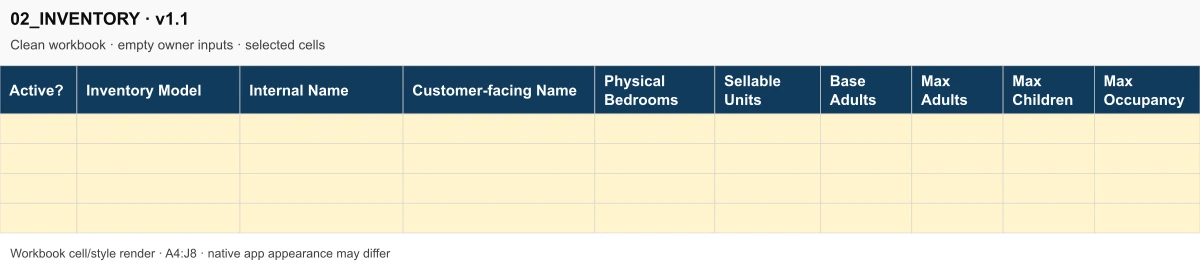
Selected columns from the clean inventory builder. Enter actual quantities; review the worksheet’s warning column before using them in your account.
Enlarge 02_INVENTORY excerpt ↗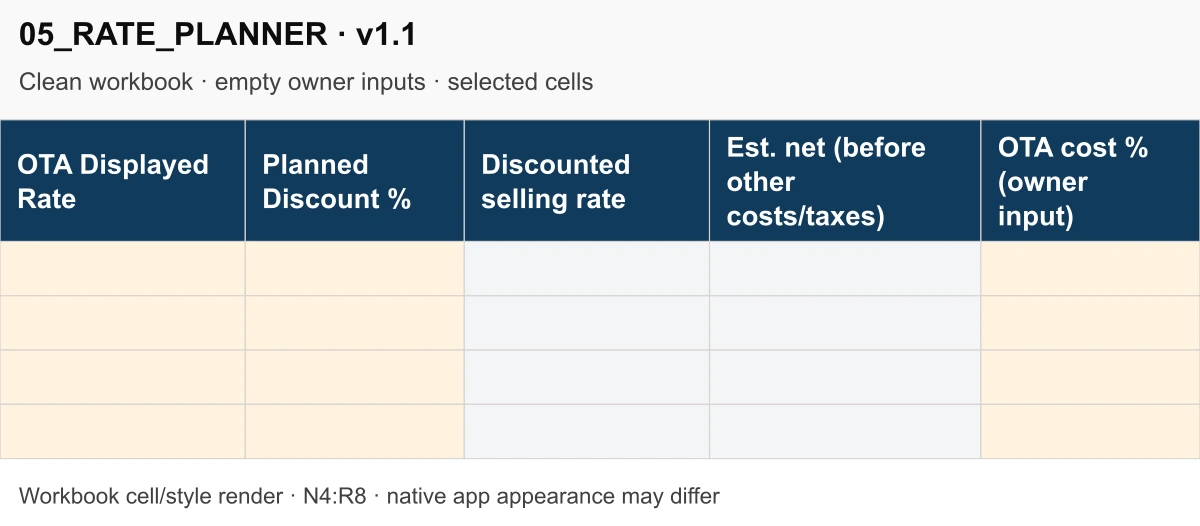
The clean rate planner separates the displayed rate, discount, calculated selling rate, estimated net and owner-entered OTA cost. Empty inputs are not a completed scenario.
Enlarge 05_RATE_PLANNER excerpt ↗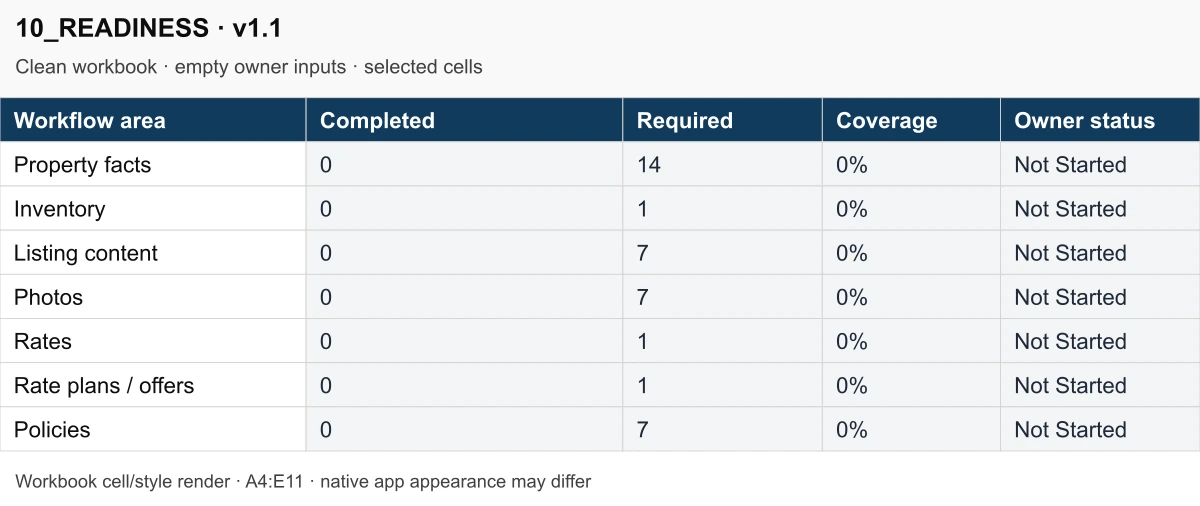
The blank workbook starts at zero completion. Its core check counts and statuses update from your inputs; this is not a MakeMyTrip approval score.
Enlarge 10_READINESS excerpt ↗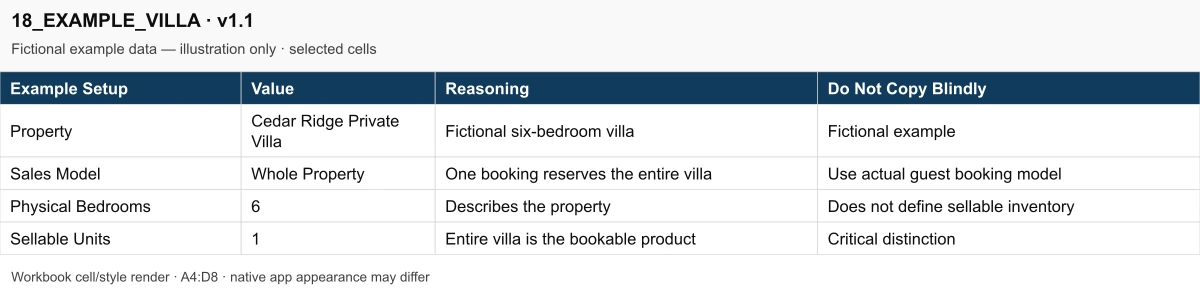
The fictional Cedar Ridge example records six physical bedrooms and one sellable whole-property unit. Replace example facts with your own verified information.
Fictional example data — illustration only.
Enlarge 18_EXAMPLE_VILLA excerpt ↗Only bounded raster excerpts are public. The complete workbook and guides are part of the paid customer package.
The rate planner links active inventory names and base adults. Enter your own selling rates, discount and OTA cost percentage; review the estimated amount after that cost. The offer planner also supports sequential discounts and a separately entered net floor.
Policies reuse master facts and compare them with text you record from active channels. A different phrase may mean the same policy: review flagged differences by meaning, rather than copying blindly.
Four files in the v1.1 customer ZIP. The workbook is your working tool; the guides help you start and keep a routine.
SMH_MakeMyTrip_Launch_Operating_Kit_v1.1.xlsx
19 worksheets for preparation, pricing, internal readiness, published-listing checks and operating routines. Includes fictional hotel and whole-villa reference sheets.
START_HERE.pdf
Five A4 pages explaining the booking models, input habits, rate assumptions, preparation gate and first-90-day sequence.
QUICK_REFERENCE.pdf
Two A4 pages of practical operating checks and reminders to keep beside your working copy.
VERSION.txt
V1.1 release details, opening instructions, changes and product limitations.
Download the package, read START_HERE.pdf and keep a clean backup. Work through this sequence in a private copy.
Start in 00_START_HERE. Decide what one reservation makes unavailable: an individual room/unit, the whole property or a carefully mapped hybrid configuration.
Enter owner-approved property information. Build only actual sellable inventory and resolve occupancy, duplicate-name and whole-property warnings.
Draft verified content, select relevant photos, enter rates and account costs, decide a rate plan and confirm core policies.
Use the seven preparation areas to find unfinished work. A complete dashboard means ready for owner review; it does not approve the listing.
Manually enter settings in Connect by MakeMyTrip. After activation, inspect the guest-facing listing and assign corrections using LIVE QA.
Use operating checklists, the 90-day plan, your actual performance figures and the issue log to keep reviews consistent.
The download is an Excel XLSX plus PDF guides and a TXT note. No macros, scripts, API keys or mandatory spreadsheet add-ins are included. Suitable spreadsheet software is needed; a computer is recommended.
Keep a clean backup and use a private working copy. Enter verified information in gold input cells; preserve grey linked and calculated cells.
A native Excel desktop open/recalculate round-trip has not been independently verified for this release. Package structure and cached formula checks do not prove every editing, dropdown, protection or printing behaviour.
You may try importing the XLSX into your own Google Drive. A full live Google Sheets import has not been independently verified. Check core formulas, dropdowns, links, layout and protection before relying on it. No native Google Sheets version or shared seller workbook is included.
Google’s Excel-to-Sheets guidanceRegistration, eligibility checks, listing configuration, rates, availability, bookings, payments and guest communication happen in Connect by MakeMyTrip or your authorised systems. The workbook has no live platform integration and makes no approval, ranking, booking or revenue guarantee.
Manual performance figures need consistent source data. Available and sold nights refer to sellable units; a whole villa uses villa-nights. Blank or inconsistent inputs should be reviewed, not treated as measured results.
Self-service digital toolkit · V1.1
₹999INR · public Payhip price · one-time
Get the MakeMyTrip Operating KitThe checkout names this product “SMH MakeMyTrip Launch Operating Kit V1.1”. Confirm the final total there. No Scale My Hotel account or lead form is required to open checkout.
One workbook, two PDF guides and VERSION.txt. No required operating subscription for the workbook; agency implementation is separate.
Review the software and inventory limits. Refund policy: All sales are final on digital downloads. Because files are delivered immediately upon completed transaction via Payhip, purchases are non-refundable.
No personal consulting, custom implementation, lifetime updates or support response time is promised with this download. For technical file access issues, contact Scale My Hotel support with your order receipt.
Payhip handles checkout. After successful payment, use the download instructions provided there, extract the customer ZIP and open START_HERE.pdf before editing the workbook.
See our refund policy, privacy policy, and site terms. Technical delivery support is available via email.
No. This is an independent Scale My Hotel toolkit, with no MakeMyTrip or Goibibo affiliation or endorsement. Official registration and onboarding guidance remain available from MakeMyTrip. You pay for a connected preparation and operating workbook that coordinates your facts, inventory, rates, photos, policy checks and follow-up—not for access to registration.
No. You manually register, configure and verify the actual listing in Connect by MakeMyTrip or your authorised operating software. The workbook has no live account connection, rate updates, calendar synchronisation or automatic guest messaging. It does not replace a PMS or channel manager.
Yes. Choose Room / Unit Based, Whole Property, Hybrid / Multiple Configurations or Unsure in the workbook. A six-bedroom villa sold to one group is generally one sellable unit; independently bookable hotel rooms are separate units. A hybrid choice does not synchronise overlapping room and whole-property capacity: resolve mapping and restrictions before launch. Actual eligibility remains platform-specific.
No. Seven core preparation areas drive the readiness dashboard: property facts, inventory, listing content, photos, rates, rate plans/offers and policies. The sales model must also be resolved. Competitor notes, technology decisions and examples are optional/reference material; live QA begins after activation. Gold cells accept inputs and grey cells are linked or calculated.
The supplied file is an Excel XLSX with conventional formulas and no macros, scripts, APIs or mandatory add-ins. Suitable spreadsheet software is required; a computer is recommended. A full live Google Sheets import and native Excel desktop round-trip have not been independently verified for this release. If importing to Sheets, check formulas, dropdowns, links, layout and protection before relying on a working copy.
Yes. Use it to organise current property facts, inventory, rates, content and policies, then inspect the guest-facing listing with LIVE QA. The operating checklist, 90-day plan, manual performance tracker and issue log can support ongoing reviews. They do not monitor your account automatically.
No. An internal 100% preparation score is not platform approval. Eligibility, activation, account terms and live operations remain subject to MakeMyTrip’s requirements. Rankings, reservations and financial results are not guaranteed. Rates and net estimates depend on your inputs and exclude unmodelled taxes and costs.
The v1.1 customer package contains one 19-sheet XLSX, START_HERE.pdf, QUICK_REFERENCE.pdf and VERSION.txt. The workbook requires no operating subscription. This is a self-service product; account setup, consulting and custom implementation are separate services. All sales are final on digital downloads; because files are delivered immediately upon payment confirmation via Payhip, purchases are non-refundable. For technical access or unzipping issues, contact Scale My Hotel with your Payhip receipt.
Practical Digital Toolkits
Every kit is a self-service, one-time digital purchase built around practical spreadsheets and operational guides. Choose the right tool for your property stage and channel scope.
| Product & Best-Fit Buyer | Primary Operational Job | Property Stage | Platform Scope | Main Deliverables | Price & Details |
|---|---|---|---|---|---|
| For Operating Properties Hotel Growth Operating Workbook Operating independent hotels, boutique resorts & multi-room accommodation | Revenue planning, ADR/RevPAR tracking, OTA commission cost analysis, and monthly commercial review cadence | Active Operating Properties | Whole-business cross-channel (Direct, OTAs, Corporate, Offline) | 2 workbooks (blank + fictional example .xlsx) + start guide (.pdf + .html) + WhatsApp SOP + CSV reply library + 2 guides | ₹1,999 INR
View Kit |
| For New Openings Property Launch Operating Kit Owners, GMs & operators preparing a new property launch or major repositioning | Centralising property facts, room inventory, policies, rate architecture, photography brief & launch handover | Pre-Opening & Launch (0–90 days) | Cross-channel distribution foundation (Booking.com, MMT, Agoda, Expedia, Direct engine) | 15-tab master launch tracker (.xlsx) + 8-page Quick Start Guide (.pdf) + README.txt | ₹1,999 INR
View Kit |
| Booking.com Dedicated Booking.com Launch Operating Kit Hotels, villas & resorts setting up or re-optimising on Booking.com | Extranet setup, room types, cancellation policies, Opportunity Centre readiness & first-90-days routines | Channel Launch & Listing Tune-Up | Booking.com Extranet | 13-sheet clean master (.xlsx) + 2 worked examples (.xlsx) + Quick Start PDF + 11 guest messages (.txt) + licence PDF | ₹999 INR
View Kit |
| MakeMyTrip / IngoMMT Current Page MakeMyTrip Launch Operating Kit Indian independent hotels, homestays & resorts onboarding on MakeMyTrip + Goibibo | IngoMMT extranet onboarding, room category setup, meal plan mappings, seasonal rates & launch checks | Channel Launch & Listing Tune-Up | MakeMyTrip & Goibibo (IngoMMT Extranet) | 19-worksheet connected workbook (.xlsx) + 5-page Start Here PDF + 2-page Quick Reference PDF + VERSION.txt | ₹999 INR Viewing Now |
| Villas & Vacation Rentals Airbnb Launch Operating Kit Villas, private vacation rentals, homestays & serviced apartment hosts | Whole-unit listing setup, photo captions, house rules, cleaner handover, message templates & 90-day host routine | Vacation Rental Launch & Host Onboarding | Airbnb (Whole-unit & private accommodations) | 19-tab launch tracker (.xlsx) + START_HERE.pdf + CLEANER_BRIEF.pdf + 10 in-workbook guest-message drafts | ₹999 INR
View Kit |
| Expedia Partner Central Expedia Launch Operating Kit Independent hotels & resorts listing on Expedia Partner Central for inbound reach | Partner Central onboarding, rate structures (Package, Member, Mobile), room setup & launch checks | Channel Launch & Listing Tune-Up | Expedia Group (Expedia, Hotels.com, Vrbo) | 13-worksheet connected workbook (.xlsx) + 2-page Start Here PDF + Licence & support guide PDF | ₹999 INR
View Kit |
Operating independent hotels, boutique resorts & multi-room accommodation
Revenue planning, ADR/RevPAR tracking, OTA commission cost analysis, and monthly commercial review cadence
Active Operating Properties
Whole-business cross-channel (Direct, OTAs, Corporate, Offline)
2 workbooks (blank + fictional example .xlsx) + start guide (.pdf + .html) + WhatsApp SOP + CSV reply library + 2 guides
Owners, GMs & operators preparing a new property launch or major repositioning
Centralising property facts, room inventory, policies, rate architecture, photography brief & launch handover
Pre-Opening & Launch (0–90 days)
Cross-channel distribution foundation (Booking.com, MMT, Agoda, Expedia, Direct engine)
15-tab master launch tracker (.xlsx) + 8-page Quick Start Guide (.pdf) + README.txt
Hotels, villas & resorts setting up or re-optimising on Booking.com
Extranet setup, room types, cancellation policies, Opportunity Centre readiness & first-90-days routines
Channel Launch & Listing Tune-Up
Booking.com Extranet
13-sheet clean master (.xlsx) + 2 worked examples (.xlsx) + Quick Start PDF + 11 guest messages (.txt) + licence PDF
Indian independent hotels, homestays & resorts onboarding on MakeMyTrip + Goibibo
IngoMMT extranet onboarding, room category setup, meal plan mappings, seasonal rates & launch checks
Channel Launch & Listing Tune-Up
MakeMyTrip & Goibibo (IngoMMT Extranet)
19-worksheet connected workbook (.xlsx) + 5-page Start Here PDF + 2-page Quick Reference PDF + VERSION.txt
Villas, private vacation rentals, homestays & serviced apartment hosts
Whole-unit listing setup, photo captions, house rules, cleaner handover, message templates & 90-day host routine
Vacation Rental Launch & Host Onboarding
Airbnb (Whole-unit & private accommodations)
19-tab launch tracker (.xlsx) + START_HERE.pdf + CLEANER_BRIEF.pdf + 10 in-workbook guest-message drafts
Independent hotels & resorts listing on Expedia Partner Central for inbound reach
Partner Central onboarding, rate structures (Package, Member, Mobile), room setup & launch checks
Channel Launch & Listing Tune-Up
Expedia Group (Expedia, Hotels.com, Vrbo)
13-worksheet connected workbook (.xlsx) + 2-page Start Here PDF + Licence & support guide PDF
Need help choosing? For an operating property conducting monthly commercial reviews, choose the Hotel Growth Operating Workbook. For preparing an upcoming property opening across all channels, choose the Property Launch Operating Kit. For focused setup on a single platform, select the dedicated channel kit (Booking.com, MakeMyTrip, Airbnb, or Expedia).
MakeMyTrip Launch Operating Kit V1.1 · XLSX + two PDF guides + version notes · ₹999 INR
Professional account work is separately scoped. Explore OTA listing and content optimisation if you want specialist setup or review.
For a quick starting check, use the free MakeMyTrip self-report audit. It does not scan your live account or reproduce a platform ranking formula.
Working across channels? See the Booking.com kit, Airbnb kit or broader Property Launch Kit.
Scale My Hotel
Need help growing your hotel's direct bookings? Chat with us directly on WhatsApp.
Start WhatsApp ChatPrices and available services may vary by market. Final scope and pricing are confirmed before engagement.