Review your OTA listings and photos
Record checks for MakeMyTrip, Goibibo and the other platforms you use. Track owners, due dates, evidence and approved photo coverage.
03 OTA · 04 Photos · 04a Photo Coverage
A self-service resource for independent hotels
Run your hotel’s growth decisions with more clarity.
Review channels, rate parity, enquiry follow-ups and OTA payouts in one connected workbook. Assign concrete corrections with owners, due dates and completion evidence.
₹1,999INR · one-time digital purchase
Get the workbookContinue to Payhip checkout. Review the final total and purchase terms there.
Explore what’s inside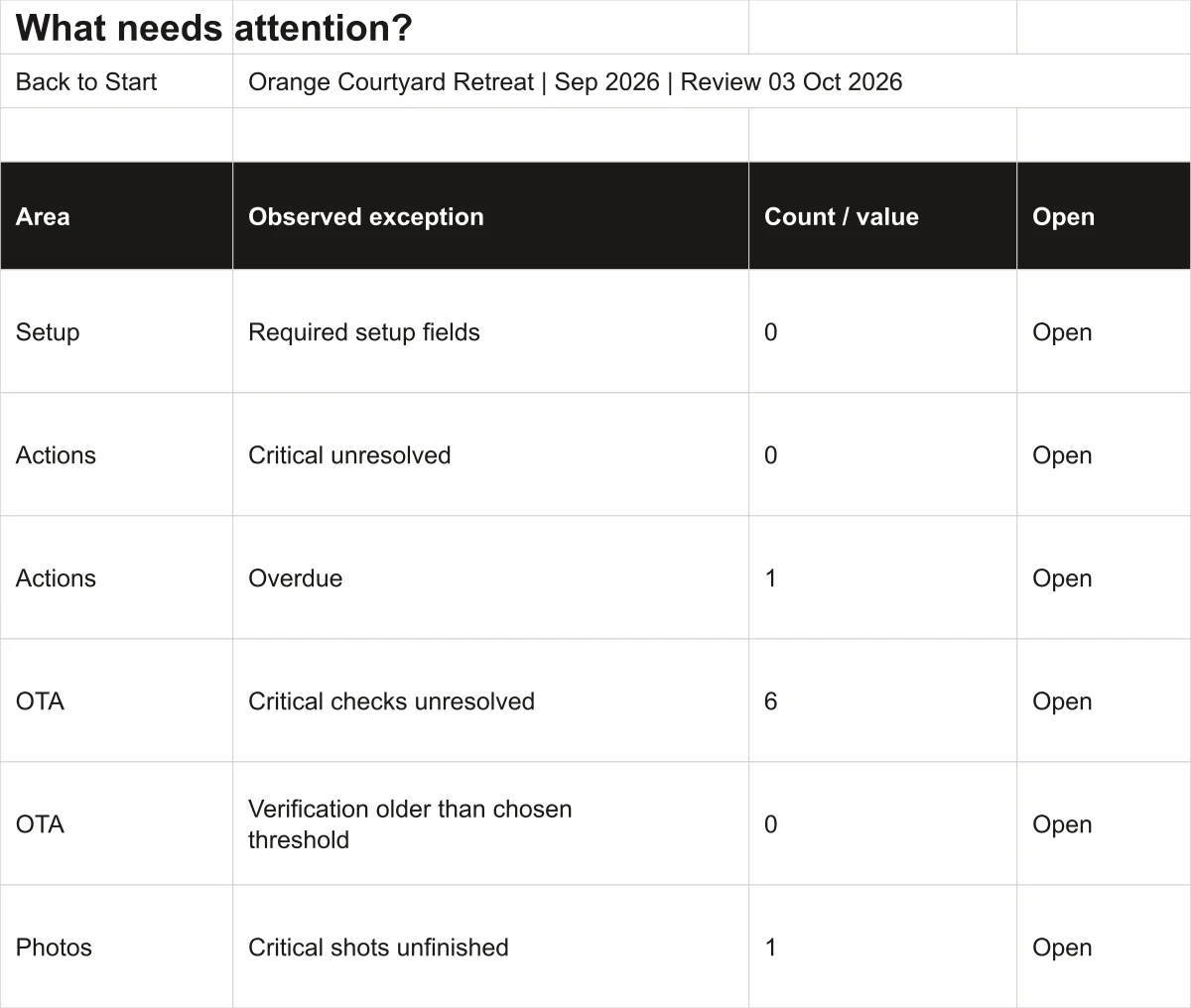
Your OTA reports, rate decisions, enquiry records and payout statements answer different questions. This workbook gives you a shared property setup and a repeatable way to review those records, spot an exception and follow through.
You supply the data and judgement. The workbook provides calculations, checks and a place to record the next action.
Inside the workbook
You can work on one module at a time. Shared setup connects the records to the Command Centre and Issue Queue.
Record checks for MakeMyTrip, Goibibo and the other platforms you use. Track owners, due dates, evidence and approved photo coverage.
03 OTA · 04 Photos · 04a Photo Coverage
Enter revenue and attributable distribution costs. Review contribution alongside occupancy, ADR and RevPAR, with incomplete records flagged.
05 Channels · 06a Stay KPIs
Model adjustments within your floor and ceiling rates. Record inventory observations, rationale, the final approved rate and publishing status.
06 Pricing
Track quote expiry, next follow-up, owner and loss reason. Use the reservations procedure and editable replies to support the handover.
07 Reservations · WhatsApp SOP · Quick replies
Compare like-for-like direct and OTA stays. Check fulfilment costs and capacity, then record actual upsell sales and their contribution.
08 Direct Offers · 10 Upsells · 10a Upsell Sales
Compare expected and confirmed OTA payouts. Review monthly source records, then assign corrections with a due date and completion evidence.
13 OTA Payouts · 12 Monthly Review · 14 Actions
Also included: Google checks, launch tasks, review decisions, photo coverage, resources and help. The file has 22 visible tabs and one hidden configuration tab.
These are small worksheet renders from the included fictional example. Open a preview for a larger view. Captions describe each task without relying on the image.
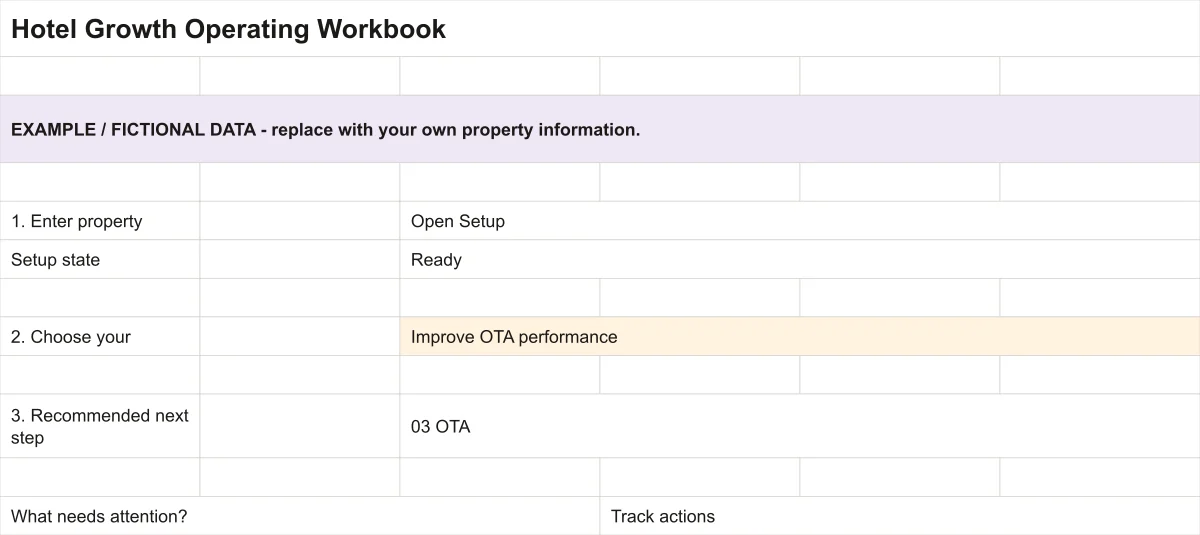
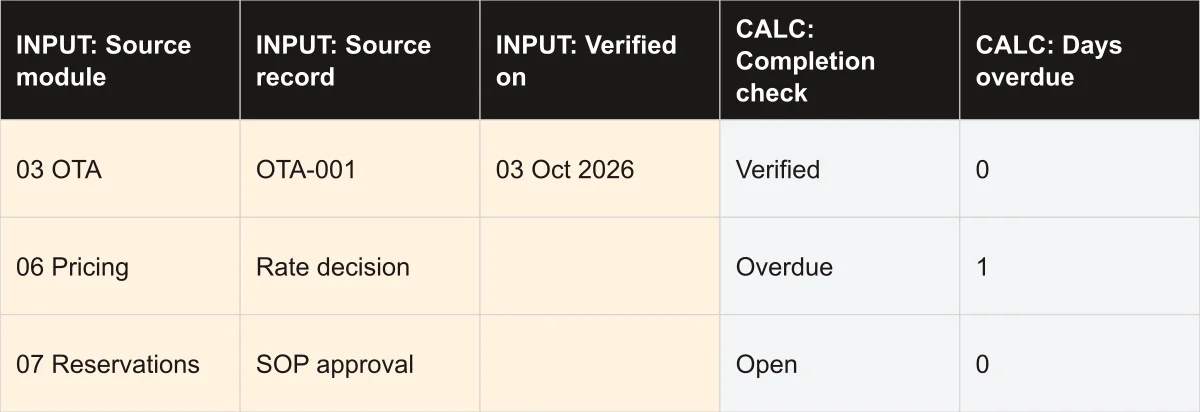
All previews use fictional example data. Colours and layout can differ after Google Sheets conversion.
The start guide walks you through this workflow. Begin in the blank workbook and keep the fictional example separate.
Enter inventory, currency, reporting month, review date and owners once in 01 Setup.
Add the relevant records. Read the input-state checks, calculated outputs and exceptions.
Use the Issue Queue to identify a gap. Manually create an action with its source, owner and due date.
Add the result and evidence, verify completion, and keep a dated copy for your next review.
For independent hotel, boutique hotel and resort owners, general managers and commercial teams who want a structured way to review their own records.
Eight customer files: two workbooks, four PDFs, an offline HTML start guide and an editable CSV library.
Your starting copy: shared setup, review modules, Command Centre, Issue Queue, actions and help.
A separate worked example using Orange Courtyard Retreat. All identities, amounts and outcomes are synthetic.
Setup, choosing a module, recording an action, financial bases, capacity and common fixes.
Enquiry, quote, payment checks, confirmation, follow-up and shift handover.
Nine editable replies for acknowledgement, quotation, payment, alternatives, confirmation, expiry, follow-up, cancellation and handover.
Costing, comparable stays, guest terms, fulfilment, approval and actual results.
File roles, maintaining your working copy, version changes and how to describe an issue.
Use a desktop or tablet for wide financial entry. A phone is better suited to reading the start guide and selected summary columns.
Extract the download, save your own copy and open it in a supported desktop Excel installation with automatic calculation enabled. No macros are required.
Supplied release testing checked opening and core calculations in Excel 16.0. Full editing, saving and printing in licensed Excel have not yet been tested.
Upload the XLSX to your own Google Drive, open it with Google Sheets and choose File → Save as Google Sheets. Keep that working copy private.
Supplied testing checked core calculations after native conversion. Navigation and presentation can change; use the numbered tabs if links do not import. Full browser and mobile editing usability remains unverified.
Use the supplied record ranges. They include 500 enquiries, 1,000 OTA payouts and 500 actions. Extending beyond preformatted rows requires formula maintenance. Use one currency and consistent financial bases; the currency label does not convert amounts.
Hotel Growth Operating Workbook
Get the blank workbook, a separate fictional example and practical guides for your property’s review and action process.
₹1,999INR · one-time digital purchase
Get the workbookCheckout is on Payhip. The final total and any applicable tax are shown there.
Keep your receipt. If access fails, contact Scale My Hotel with your order reference.
Refund policy: All sales are final on digital downloads. Because files are delivered immediately upon payment confirmation via Payhip, purchases are non-refundable. If you experience an unzipping or delivery problem, contact hi@scalemyhotel.com with your Payhip order reference.
Scale My Hotel also offers separately scoped support for hotel revenue management, OTA listing optimisation and direct-booking websites. Buying the workbook does not include these services.
For a focused calculation first, try the free OTA commission calculator or direct-booking ROI calculator. Looking for practical growth actions before purchasing? Browse our free 15 Hotel & Resort Marketing Ideas.
Practical Digital Toolkits
Every kit is a self-service, one-time digital purchase built around practical spreadsheets and operational guides. Choose the right tool for your property stage and channel scope.
| Product & Best-Fit Buyer | Primary Operational Job | Property Stage | Platform Scope | Main Deliverables | Price & Details |
|---|---|---|---|---|---|
| For Operating Properties Current Page Hotel Growth Operating Workbook Operating independent hotels, boutique resorts & multi-room accommodation | Revenue planning, ADR/RevPAR tracking, OTA commission cost analysis, and monthly commercial review cadence | Active Operating Properties | Whole-business cross-channel (Direct, OTAs, Corporate, Offline) | 2 workbooks (blank + fictional example .xlsx) + start guide (.pdf + .html) + WhatsApp SOP + CSV reply library + 2 guides | ₹1,999 INR Viewing Now |
| For New Openings Property Launch Operating Kit Owners, GMs & operators preparing a new property launch or major repositioning | Centralising property facts, room inventory, policies, rate architecture, photography brief & launch handover | Pre-Opening & Launch (0–90 days) | Cross-channel distribution foundation (Booking.com, MMT, Agoda, Expedia, Direct engine) | 15-tab master launch tracker (.xlsx) + 8-page Quick Start Guide (.pdf) + README.txt | ₹1,999 INR
View Kit |
| Booking.com Dedicated Booking.com Launch Operating Kit Hotels, villas & resorts setting up or re-optimising on Booking.com | Extranet setup, room types, cancellation policies, Opportunity Centre readiness & first-90-days routines | Channel Launch & Listing Tune-Up | Booking.com Extranet | 13-sheet clean master (.xlsx) + 2 worked examples (.xlsx) + Quick Start PDF + 11 guest messages (.txt) + licence PDF | ₹999 INR
View Kit |
| MakeMyTrip / IngoMMT MakeMyTrip Launch Operating Kit Indian independent hotels, homestays & resorts onboarding on MakeMyTrip + Goibibo | IngoMMT extranet onboarding, room category setup, meal plan mappings, seasonal rates & launch checks | Channel Launch & Listing Tune-Up | MakeMyTrip & Goibibo (IngoMMT Extranet) | 19-worksheet connected workbook (.xlsx) + 5-page Start Here PDF + 2-page Quick Reference PDF + VERSION.txt | ₹999 INR
View Kit |
| Villas & Vacation Rentals Airbnb Launch Operating Kit Villas, private vacation rentals, homestays & serviced apartment hosts | Whole-unit listing setup, photo captions, house rules, cleaner handover, message templates & 90-day host routine | Vacation Rental Launch & Host Onboarding | Airbnb (Whole-unit & private accommodations) | 19-tab launch tracker (.xlsx) + START_HERE.pdf + CLEANER_BRIEF.pdf + 10 in-workbook guest-message drafts | ₹999 INR
View Kit |
| Expedia Partner Central Expedia Launch Operating Kit Independent hotels & resorts listing on Expedia Partner Central for inbound reach | Partner Central onboarding, rate structures (Package, Member, Mobile), room setup & launch checks | Channel Launch & Listing Tune-Up | Expedia Group (Expedia, Hotels.com, Vrbo) | 13-worksheet connected workbook (.xlsx) + 2-page Start Here PDF + Licence & support guide PDF | ₹999 INR
View Kit |
Operating independent hotels, boutique resorts & multi-room accommodation
Revenue planning, ADR/RevPAR tracking, OTA commission cost analysis, and monthly commercial review cadence
Active Operating Properties
Whole-business cross-channel (Direct, OTAs, Corporate, Offline)
2 workbooks (blank + fictional example .xlsx) + start guide (.pdf + .html) + WhatsApp SOP + CSV reply library + 2 guides
Owners, GMs & operators preparing a new property launch or major repositioning
Centralising property facts, room inventory, policies, rate architecture, photography brief & launch handover
Pre-Opening & Launch (0–90 days)
Cross-channel distribution foundation (Booking.com, MMT, Agoda, Expedia, Direct engine)
15-tab master launch tracker (.xlsx) + 8-page Quick Start Guide (.pdf) + README.txt
Hotels, villas & resorts setting up or re-optimising on Booking.com
Extranet setup, room types, cancellation policies, Opportunity Centre readiness & first-90-days routines
Channel Launch & Listing Tune-Up
Booking.com Extranet
13-sheet clean master (.xlsx) + 2 worked examples (.xlsx) + Quick Start PDF + 11 guest messages (.txt) + licence PDF
Indian independent hotels, homestays & resorts onboarding on MakeMyTrip + Goibibo
IngoMMT extranet onboarding, room category setup, meal plan mappings, seasonal rates & launch checks
Channel Launch & Listing Tune-Up
MakeMyTrip & Goibibo (IngoMMT Extranet)
19-worksheet connected workbook (.xlsx) + 5-page Start Here PDF + 2-page Quick Reference PDF + VERSION.txt
Villas, private vacation rentals, homestays & serviced apartment hosts
Whole-unit listing setup, photo captions, house rules, cleaner handover, message templates & 90-day host routine
Vacation Rental Launch & Host Onboarding
Airbnb (Whole-unit & private accommodations)
19-tab launch tracker (.xlsx) + START_HERE.pdf + CLEANER_BRIEF.pdf + 10 in-workbook guest-message drafts
Independent hotels & resorts listing on Expedia Partner Central for inbound reach
Partner Central onboarding, rate structures (Package, Member, Mobile), room setup & launch checks
Channel Launch & Listing Tune-Up
Expedia Group (Expedia, Hotels.com, Vrbo)
13-worksheet connected workbook (.xlsx) + 2-page Start Here PDF + Licence & support guide PDF
Need help choosing? For an operating property conducting monthly commercial reviews, choose the Hotel Growth Operating Workbook. For preparing an upcoming property opening across all channels, choose the Property Launch Operating Kit. For focused setup on a single platform, select the dedicated channel kit (Booking.com, MakeMyTrip, Airbnb, or Expedia).
Preparing a property before booking-channel setup? The separate Property Launch Operating Kit connects property facts, inventory, policies and handover preparation.
Preparing a Booking.com listing or reviewing its first 90 days? See the focused Booking.com Launch & 90-Day Operating Kit.
A clearer review. An assigned next action.
Get the workbook on PayhipScale My Hotel
Need help growing your hotel's direct bookings? Chat with us directly on WhatsApp.
Start WhatsApp ChatPrices and available services may vary by market. Final scope and pricing are confirmed before engagement.