Enter verified facts once
Confirm your property model, location, facilities and guest rules. Relevant content checks and message drafts reuse those facts.
PROPERTY · CONTENT · MESSAGES
Independent workbook · V1.1 · Digital download
Prepare your listing. Know your numbers.
Organise your first 90 days.
One connected workbook to map villa or hotel inventory, prepare listing content and policies, model rates after deductions, and track launch checks and first-90-day reviews.
For owner-led villas, holiday homes, homestays, guesthouses, boutique hotels and small resorts—including existing listings with an incomplete setup.
₹999INR · one-time purchase
Get the Booking.com Launch KitCheckout and digital delivery through Payhip. The final applicable total is shown there. Read purchase information before paying.
See what’s insideXLSX + PDF + TXT · Private Google Sheets import · Computer recommended
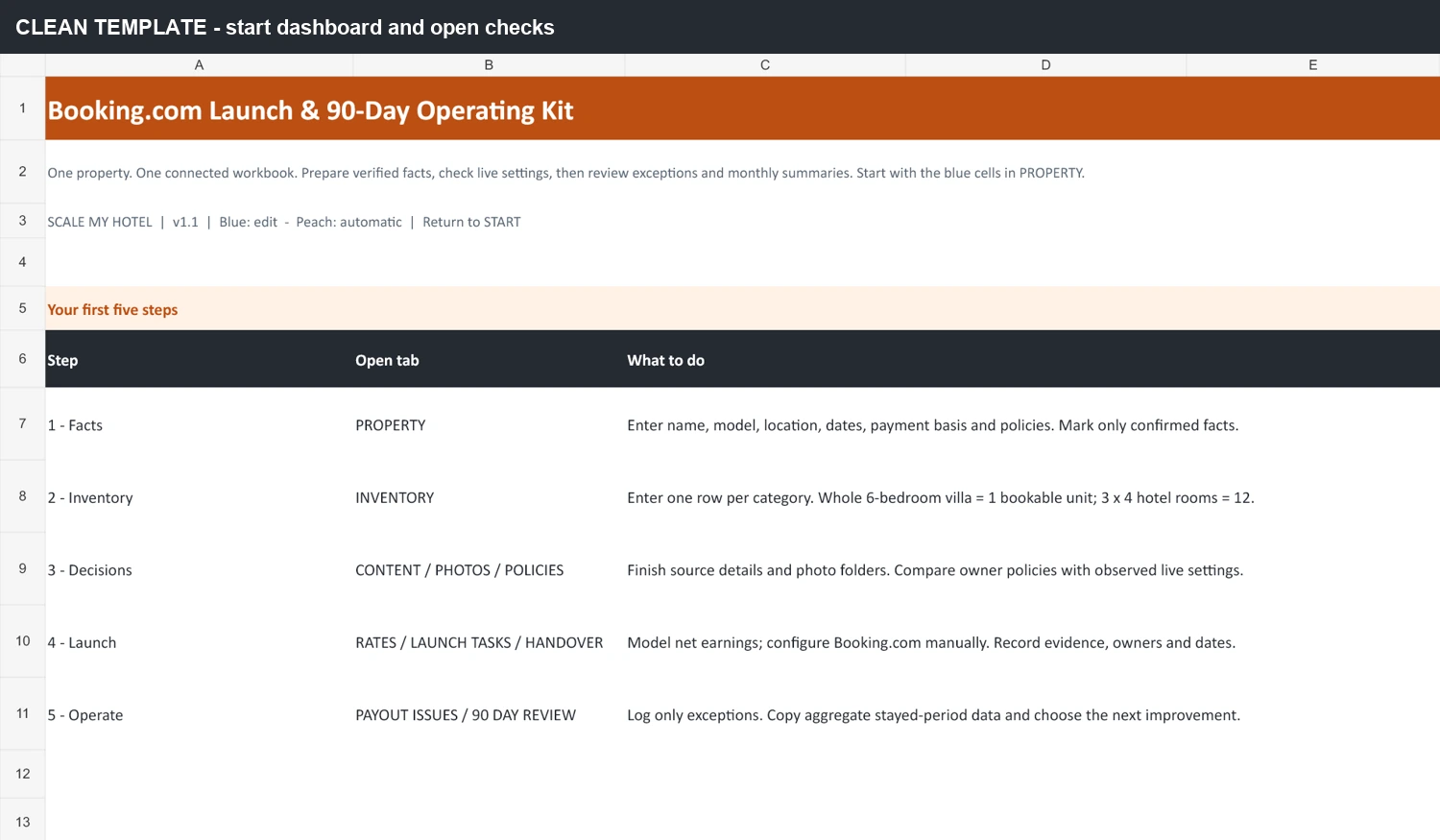
The work behind the listing
When room quantities live in one file, policies in a WhatsApp chat and rates in someone’s notes, it is hard to tell what is ready—and what has actually been checked. A listing draft can look complete while photographs, payment assumptions or responsibilities remain unresolved.
Booking.com’s official guidance explains its platform. This kit organises your own preparation, commercial assumptions and follow-through. You still configure your account and verify its live settings.
Work from reusable property facts to live checks, then keep a manageable review routine after launch.
Confirm your property model, location, facilities and guest rules. Relevant content checks and message drafts reuse those facts.
PROPERTY · CONTENT · MESSAGES
Keep bedrooms, bookable quantity and guest capacity separate. Prepare up to 12 categories using the entire-property or room-based model.
INVENTORY
Check photo coverage for active categories and compare owner decisions with observed listing and rate-plan conditions.
CONTENT · PHOTOS · POLICIES
Enter weekday/weekend rates, occupancy, effective discounts, extras, actual fee assumptions and variable costs. Review the amounts left after deductions.
RATES
Record live-setting evidence, dates and outstanding checks. Give reservation alerts, availability, arrivals and follow-up a primary owner and backup.
START · LAUNCH TASKS · HANDOVER
Track up to 50 payout exceptions separately from your reservation ledger. Use three consecutive 30-day summaries to choose the next actions.
PAYOUT ISSUES · 90 DAY REVIEW
HELP adds definitions, official reference links, limitations and troubleshooting.
What is independently bookable?
A bookable unit is accommodation a guest can reserve independently. The included worked examples show why physical bedrooms and bookable quantity need separate fields.
Included fictional villa example
6 bedrooms → 1 whole villa → 1 unit
One group reserves the entire home. Six physical bedrooms remain one independently bookable unit. Over 30 nights, that is 30 available unit-nights before closures.
Fictional example data — illustration only.
Included fictional hotel example
4 Standard + 4 Deluxe + 4 Family
Each room can be reserved separately: 12 independently bookable rooms. Over 30 nights, that is 360 available room-nights before closures.
Fictional example data — illustration only.
Shared whole-property and room inventory is outside the model. Selling the same bedrooms both separately and as a whole villa creates overlapping capacity. Hybrid inventory is intentionally blocked; it needs specialist mapping and suitable operating software.
Genuine excerpts from the clean master and included teaching files. Open each image to read it at full size. These are workbook views, not Booking.com dashboard screenshots.
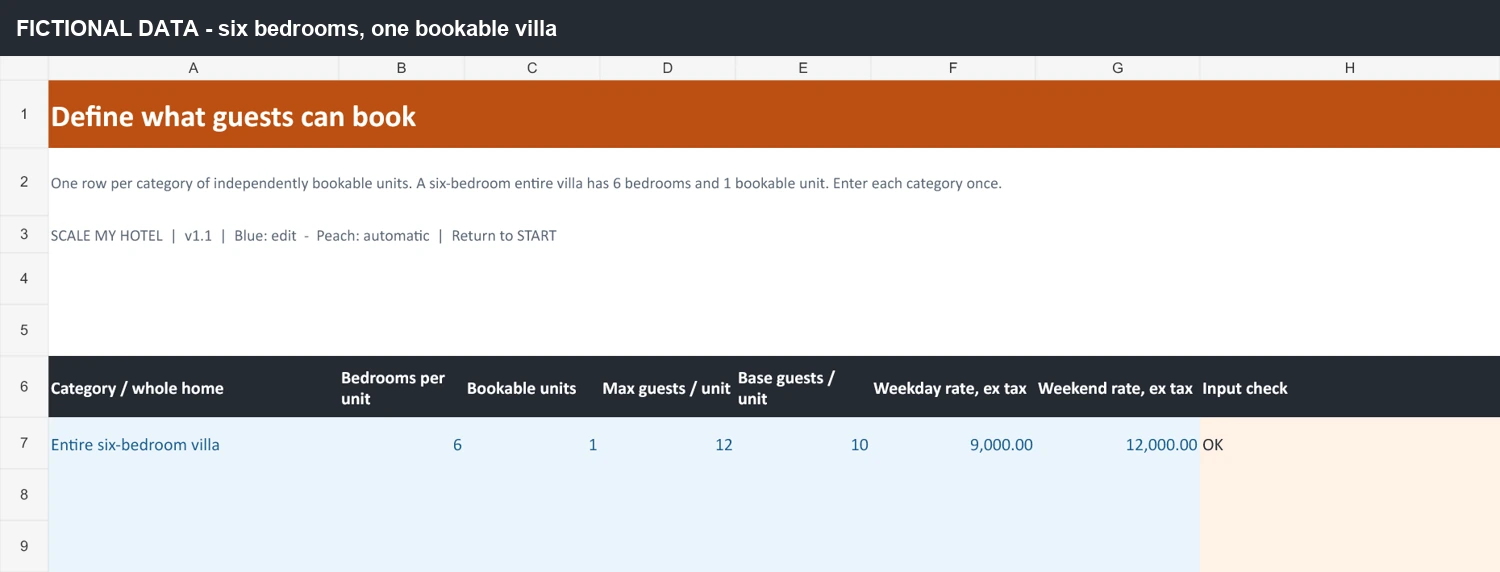
The included villa example records six physical bedrooms and one independently bookable unit. Blue cells hold inputs; peach cells show the input check.
Fictional example data — illustration only.
Enlarge INVENTORY preview ↗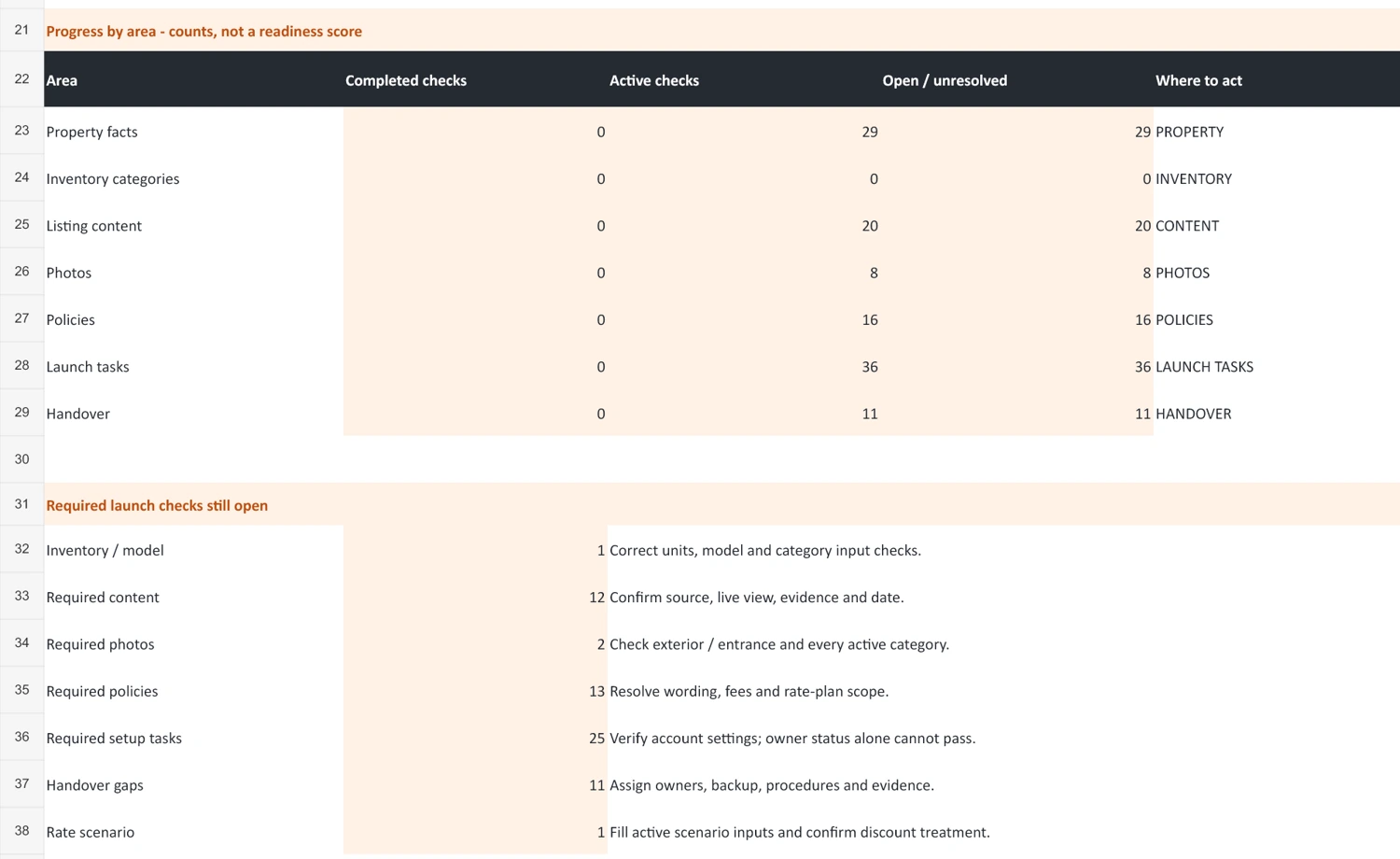
The clean master separates completed, active and unresolved checks. An open live-setting check needs manual verification; this view does not approve a property.
Enlarge START preview ↗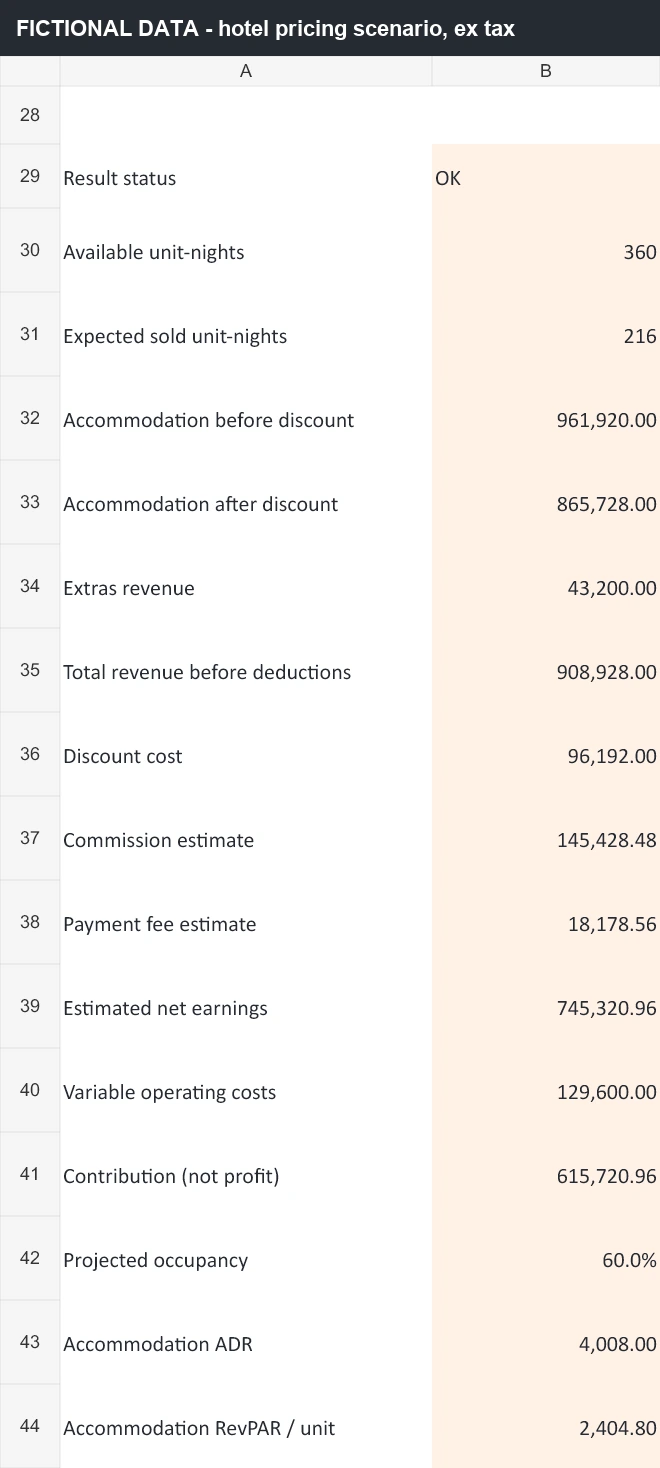
The hotel example shows accommodation and extras revenue, estimated fees, variable costs and contribution. All amounts and occupancy assumptions are synthetic and exclude tax.
Fictional example data — illustration only.
Enlarge RATES preview ↗Excerpts show selected rows and columns. Spreadsheet formatting, navigation and protection can vary after conversion.
Commercial scenario, entered by you
RATES models one period at a time. Enter weekday/weekend rates, expected occupancy, the effective discount, extras, commission/payment assumptions and variable costs.
Review expected sold nights, revenue before and after discount, estimated fees, net receipts and contribution. Use your actual agreement percentage and chargeable base; no universal commission rate is supplied.
ADR means average daily rate: accommodation revenue divided by sold nights. RevPAR means revenue per available room; the villa model uses whole-home unit-nights instead.
Scenario fees use accommodation plus extras revenue, excluding tax. If your agreement uses another base, model it separately. Taxes, refunds, fixed overheads and cash settlement timing are excluded from RATES.
Contribution is not accounting profit. It subtracts only the variable costs you enter. These are scenarios, not forecasts, market-rate recommendations or promises of returns.
Try the free OTA commission calculator“Owner-confirmed” records a prepared fact or decision. A live task still needs a Booking.com check, evidence, a responsible owner and an actual date. Completing a workbook row does not prove a setting is live.
Verify the guest view, quantities, rates, availability, policies and notifications. Confirm reservation and arrival responsibilities. Review content, guest issues and payout exceptions regularly.
Use stayed-night reports to review rates, cancellations, actual deductions and guest feedback. Test an offer’s economics before changing live settings.
Compare the three consecutive 30-day summaries using a consistent basis. Record the next improvements, responsible owners and due dates.
Payout exceptions, without duplicate reservation entry: use actual retained amounts, deductions and receipts for up to 50 exceptions. A blank receipt means unknown; a numeric zero means verified nothing received. This is manual review, not automated analytics or payment processing.
Six customer files: one clean working system, two teaching examples and practical opening and usage guidance.
Booking_com_Operating_Kit_v1_1.xlsx
Your working master: 13 sheets for preparation, verification and operating reviews. Blue cells accept inputs; peach cells contain linked facts and calculations.
EXAMPLES/Worked_Example_Entire_Villa_v1_1.xlsx
A fictional six-bedroom villa sold as one entire unit, with populated facts and a rate scenario to learn from.
EXAMPLES/Worked_Example_12_Room_Hotel_v1_1.xlsx
A fictional hotel with four Standard, four Deluxe and four Family rooms. Three categories retain their actual quantities and guest capacities.
START_HERE.pdf
Four pages covering private setup, the inventory models, input habits, live verification and the first-90-day routine.
COPY_PASTE_GUEST_MESSAGES.txt
11 editable drafts for confirmation, arrivals, stay support, checkout, issues, review responses and payment queries. Review and send manually.
LICENSE_AND_NOTES.pdf
Usage rights, product boundaries, privacy, financial limits and compatibility notes. No recurring subscription is required.
Payhip handles checkout and digital delivery. Extract the ZIP and read START_HERE.pdf before editing.
Use the clean XLSX with suitable spreadsheet software or import it into your own Drive and save as Google Sheets. Keep sharing Restricted.
Begin in PROPERTY, choose Entire property or Room-based, then fill INVENTORY with actual quantities and guest capacities.
Work through content, photographs, policies and one rate scenario. Apply settings manually in Booking.com; record actual evidence, dates and owners.
Use existing stayed-night reports and actual deductions. Track payout exceptions, compare periods and assign your next actions.
No macros, Apps Script, API keys or mandatory paid spreadsheet add-ons are required. A computer is recommended for the wider tables.
Upload the clean XLSX to your private Google Drive, open it with Sheets, then choose File → Save as Google Sheets if needed. A Google account and internet access are needed for import. No seller Drive access or shared master link is required.
The supplied V1.1 QA records native import and calculation checks. Excel locking may not transfer; check dropdowns and recreate formula-range protection if needed. Keep sharing Restricted and edit blue inputs only.
Google’s Excel-to-Sheets guidanceThe included XLSX uses standard formulas. Save a working copy and use automatic calculation. Inputs are unlocked; formula cells are protected without a password in the XLSX.
Native Excel desktop regression is not verified for this release. The package’s formula and file checks do not establish full desktop editing, protection, filtering or printing behaviour.
Keep category order fixed. Do not sort, insert or delete rows in linked blocks. Formula protection helps avoid accidental edits; it is not privacy security.
You create and configure the account, publish the listing, apply rates and policies, manage availability, send messages and handle payments through Booking.com or your operating systems. The workbook has no live Booking.com integration and does not replace a PMS or channel manager or prevent double bookings.
It does not determine eligibility, certify legal or tax compliance, or guarantee approval, visibility, rankings, reservations, occupancy or revenue.
Self-service · One-time download
₹999INR · current Payhip price · one-time
Get the Booking.com Launch KitPayment and delivery take place on Payhip. Confirm the applicable tax and final total there. No required subscription or agency implementation is included.
The checkout names this product “SMH Booking.com Launch Operating Kit V1.1”.
Review the inventory and software limits above. A separate workbook copy represents each property.
The included purchaser licence allows use and adaptation in your own hospitality business, including owned or managed properties, and working-copy sharing with employees and operational service providers. Resale, sublicensing and public redistribution are prohibited.
Refund policy: All sales are final on digital downloads. Because files are delivered immediately upon completed transaction via Payhip, purchases are non-refundable. For technical access or unzipping assistance, contact hi@scalemyhotel.com with your Payhip order reference.
Download the customer ZIP through Payhip, read START_HERE.pdf and make a private working copy of the clean XLSX. Product questions can use the contact on your receipt or hi@scalemyhotel.com.
Read the included LICENSE_AND_NOTES.pdf. No lifetime updates, unlimited support or response-time promise is included here. Review our refund policy, site terms, privacy policy, and disclaimer.
Independent product by Scale My Hotel. Scale My Hotel is not affiliated with, endorsed by or approved by Booking.com.
It is an independent, self-service digital workbook by Scale My Hotel for villas, homestays, guesthouses, small hotels and resorts. It helps organise listing preparation, inventory, rate scenarios, launch evidence, payout exceptions and three 30-day reviews. You enter information and perform the actual platform work.
No. Scale My Hotel is not affiliated with, endorsed by or approved by Booking.com. Use Booking.com’s official help, your agreement and your own account as the platform authority.
Official help explains the platform. This kit gives you a connected working record for your own verified facts, category quantities, commercial assumptions, owner decisions, verification evidence and follow-up. It complements official instructions and does not replace them.
Yes, when the property is rented as one entire unit. The included six-bedroom villa uses one category and one bookable unit. Bedrooms remain a physical detail, not six separate bookings.
Yes, for room-based accommodation or independently bookable units with up to 12 categories. The hotel example has four Standard, four Deluxe and four Family rooms. Use the actual physical quantities and capacities for your property.
Up to 12 mapped categories per workbook. One working copy represents one property. PAYOUT ISSUES has 50 exception slots. Keep linked rows in their original order; do not sort, insert or delete category blocks.
No. Hybrid inventory with overlapping whole-property and room-level capacity is intentionally blocked. Shared capacity needs specialist mapping and a suitable PMS or channel manager. The workbook does not synchronise availability or protect against double bookings.
No. There is no live Booking.com API integration. Account creation, listing publication, rates, restrictions and availability must be configured and verified manually in the relevant platform or operating system.
No. MESSAGES contains 11 fact-linked drafts, and the TXT library has 11 editable messages. Replace placeholders, check the actual reservation and policy, then send through your approved channel. These are two formats of a message library, not 22 separate messages.
RATES estimates commission and payment fees using the assumptions you enter. Its scenario base is accommodation plus extras revenue, excluding tax. Use your actual agreement; a different chargeable base needs separate modelling. PAYOUT ISSUES uses actual stated amounts and deductions for exceptions.
It records relevant tax or local-charge requirements as preparation facts. It does not supply a universal tax engine, GST rate or legal eligibility decision. The generic rate scenario excludes tax; verify your own property requirements with the appropriate adviser.
Upload the clean XLSX into your own private Google Drive, open it with Google Sheets and save it as a native Google Sheet. A Google account and internet access are needed for import. The supplied V1.1 QA records native import and calculation checks. Excel protection may not transfer; check dropdowns and edit blue inputs only.
The download includes XLSX files using standard formulas and no macros. Native Excel desktop regression remains unverified for this release. Use a working copy and automatic calculation, and review the supplied compatibility notes before choosing Excel as your operating environment.
Use a separate workbook copy for each property. The included purchaser licence allows use and adaptation in your own hospitality business, including owned or managed properties, and sharing working copies with employees and operational service providers. Resale, sublicensing and public redistribution are prohibited.
No. Both worked examples are fictional teaching files. Their rates, occupancy, policies, fee assumptions and verification references are illustrations only. Replace them with verified facts for your own property.
No. The purchase is a self-service download. Agency setup, account work, property-specific advice and custom spreadsheet work are separately scoped services. No agency engagement is required to use the kit.
Checkout and digital delivery take place through Payhip. The V1.1 customer package contains six files: one clean workbook, two worked-example workbooks, a guest-message TXT, the Quick Start PDF and licence PDF. Start with START_HERE.pdf and keep a clean backup before making your private working copy.
No required subscription is attached to this downloadable kit. Its core functionality needs no macros, Apps Script, API keys or paid spreadsheet add-ons. This does not include third-party operating software, agency implementation or a promise of lifetime platform updates.
All sales are final on digital downloads. Because this kit is delivered immediately as an instant digital download package via Payhip upon completed payment, purchases are non-refundable. Report any file defect, unzipping issue or access difficulty to hi@scalemyhotel.com with your Payhip order reference for technical assistance. Personal consulting and a support response-time commitment are not included.
No. Workbook preparation and verified task records do not determine Booking.com approval, visibility, reservations, occupancy or revenue. The kit also does not certify legal, regulatory or tax compliance.
Practical Digital Toolkits
Every kit is a self-service, one-time digital purchase built around practical spreadsheets and operational guides. Choose the right tool for your property stage and channel scope.
| Product & Best-Fit Buyer | Primary Operational Job | Property Stage | Platform Scope | Main Deliverables | Price & Details |
|---|---|---|---|---|---|
| For Operating Properties Hotel Growth Operating Workbook Operating independent hotels, boutique resorts & multi-room accommodation | Revenue planning, ADR/RevPAR tracking, OTA commission cost analysis, and monthly commercial review cadence | Active Operating Properties | Whole-business cross-channel (Direct, OTAs, Corporate, Offline) | 2 workbooks (blank + fictional example .xlsx) + start guide (.pdf + .html) + WhatsApp SOP + CSV reply library + 2 guides | ₹1,999 INR
View Kit |
| For New Openings Property Launch Operating Kit Owners, GMs & operators preparing a new property launch or major repositioning | Centralising property facts, room inventory, policies, rate architecture, photography brief & launch handover | Pre-Opening & Launch (0–90 days) | Cross-channel distribution foundation (Booking.com, MMT, Agoda, Expedia, Direct engine) | 15-tab master launch tracker (.xlsx) + 8-page Quick Start Guide (.pdf) + README.txt | ₹1,999 INR
View Kit |
| Booking.com Dedicated Current Page Booking.com Launch Operating Kit Hotels, villas & resorts setting up or re-optimising on Booking.com | Extranet setup, room types, cancellation policies, Opportunity Centre readiness & first-90-days routines | Channel Launch & Listing Tune-Up | Booking.com Extranet | 13-sheet clean master (.xlsx) + 2 worked examples (.xlsx) + Quick Start PDF + 11 guest messages (.txt) + licence PDF | ₹999 INR Viewing Now |
| MakeMyTrip / IngoMMT MakeMyTrip Launch Operating Kit Indian independent hotels, homestays & resorts onboarding on MakeMyTrip + Goibibo | IngoMMT extranet onboarding, room category setup, meal plan mappings, seasonal rates & launch checks | Channel Launch & Listing Tune-Up | MakeMyTrip & Goibibo (IngoMMT Extranet) | 19-worksheet connected workbook (.xlsx) + 5-page Start Here PDF + 2-page Quick Reference PDF + VERSION.txt | ₹999 INR
View Kit |
| Villas & Vacation Rentals Airbnb Launch Operating Kit Villas, private vacation rentals, homestays & serviced apartment hosts | Whole-unit listing setup, photo captions, house rules, cleaner handover, message templates & 90-day host routine | Vacation Rental Launch & Host Onboarding | Airbnb (Whole-unit & private accommodations) | 19-tab launch tracker (.xlsx) + START_HERE.pdf + CLEANER_BRIEF.pdf + 10 in-workbook guest-message drafts | ₹999 INR
View Kit |
| Expedia Partner Central Expedia Launch Operating Kit Independent hotels & resorts listing on Expedia Partner Central for inbound reach | Partner Central onboarding, rate structures (Package, Member, Mobile), room setup & launch checks | Channel Launch & Listing Tune-Up | Expedia Group (Expedia, Hotels.com, Vrbo) | 13-worksheet connected workbook (.xlsx) + 2-page Start Here PDF + Licence & support guide PDF | ₹999 INR
View Kit |
Operating independent hotels, boutique resorts & multi-room accommodation
Revenue planning, ADR/RevPAR tracking, OTA commission cost analysis, and monthly commercial review cadence
Active Operating Properties
Whole-business cross-channel (Direct, OTAs, Corporate, Offline)
2 workbooks (blank + fictional example .xlsx) + start guide (.pdf + .html) + WhatsApp SOP + CSV reply library + 2 guides
Owners, GMs & operators preparing a new property launch or major repositioning
Centralising property facts, room inventory, policies, rate architecture, photography brief & launch handover
Pre-Opening & Launch (0–90 days)
Cross-channel distribution foundation (Booking.com, MMT, Agoda, Expedia, Direct engine)
15-tab master launch tracker (.xlsx) + 8-page Quick Start Guide (.pdf) + README.txt
Hotels, villas & resorts setting up or re-optimising on Booking.com
Extranet setup, room types, cancellation policies, Opportunity Centre readiness & first-90-days routines
Channel Launch & Listing Tune-Up
Booking.com Extranet
13-sheet clean master (.xlsx) + 2 worked examples (.xlsx) + Quick Start PDF + 11 guest messages (.txt) + licence PDF
Indian independent hotels, homestays & resorts onboarding on MakeMyTrip + Goibibo
IngoMMT extranet onboarding, room category setup, meal plan mappings, seasonal rates & launch checks
Channel Launch & Listing Tune-Up
MakeMyTrip & Goibibo (IngoMMT Extranet)
19-worksheet connected workbook (.xlsx) + 5-page Start Here PDF + 2-page Quick Reference PDF + VERSION.txt
Villas, private vacation rentals, homestays & serviced apartment hosts
Whole-unit listing setup, photo captions, house rules, cleaner handover, message templates & 90-day host routine
Vacation Rental Launch & Host Onboarding
Airbnb (Whole-unit & private accommodations)
19-tab launch tracker (.xlsx) + START_HERE.pdf + CLEANER_BRIEF.pdf + 10 in-workbook guest-message drafts
Independent hotels & resorts listing on Expedia Partner Central for inbound reach
Partner Central onboarding, rate structures (Package, Member, Mobile), room setup & launch checks
Channel Launch & Listing Tune-Up
Expedia Group (Expedia, Hotels.com, Vrbo)
13-worksheet connected workbook (.xlsx) + 2-page Start Here PDF + Licence & support guide PDF
Need help choosing? For an operating property conducting monthly commercial reviews, choose the Hotel Growth Operating Workbook. For preparing an upcoming property opening across all channels, choose the Property Launch Operating Kit. For focused setup on a single platform, select the dedicated channel kit (Booking.com, MakeMyTrip, Airbnb, or Expedia).
Scale My Hotel separately offers OTA Listing & SEO Optimization, Hotel Revenue Management Service, Channel Manager + WhatsApp CRM. Scope and pricing are agreed separately; buying this kit does not include agency work.
Explore separately scoped servicesClear property facts. Visible checks. An organised first 90 days.
Get the kit on PayhipScale My Hotel
Need help growing your hotel's direct bookings? Chat with us directly on WhatsApp.
Start WhatsApp ChatPrices and available services may vary by market. Final scope and pricing are confirmed before engagement.