Keep verified property facts together
Enter the property name once, record contact details and core policies, and assign verification owners. Linked facts reduce repeated entry across the workbook.
START · PROPERTY · POLICIES
Independent Excel workbook · Version 1.1
Prepare your listing.
Organise your first 90 days.
Prepare your Expedia Group listing with one connected Excel workbook. Organise property facts, room or villa setup and launch checks, then track bookings and payouts manually.
₹999INR · one-time digital purchase
Get the Expedia Launch KitContinue to Payhip for payment. Public price checked 10 October 2026; confirm the final total and terms at checkout. Read purchase information.
For independent hotels, boutique resorts, guesthouses, homestays and eligible entire-property vacation rentals in India, the UAE and other markets.
See the workbook previewsXLSX + 2 PDFs · Computer recommended · Excel and Google Sheets notes
Created by Scale My Hotel. Independent of Expedia Group, Expedia, Hotels.com and Vrbo; no affiliation, endorsement or certification.
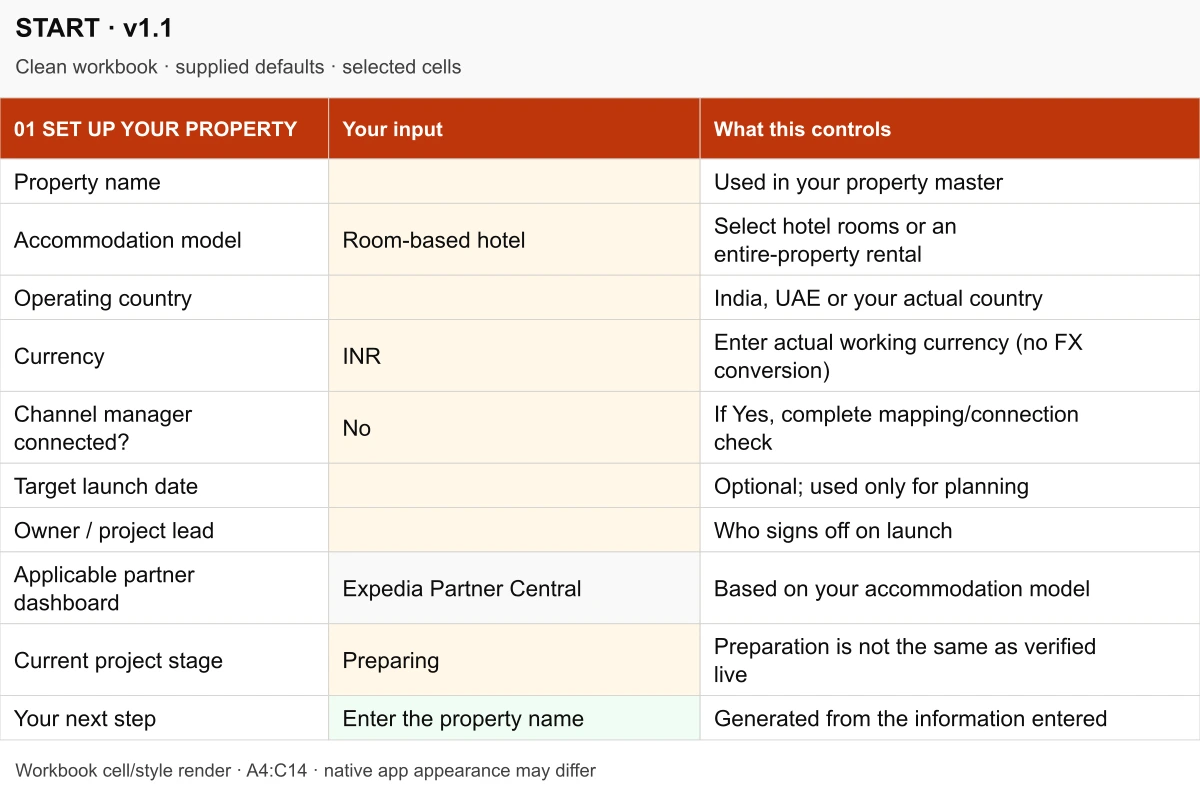
Rendered from delivered V1.1 cells and formatting. No real property data; native app appearance may differ.
A practical record around onboarding
Room categories, occupancy, photo files, policies and rates often sit in separate notes. A prepared description can disagree with a published setting. After launch, a booking may arrive without a clear record of expected and received proceeds.
The kit gives those tasks a shared working sequence, owners and review points. Expedia Group’s own onboarding and partner resources remain available independently. You buy an organising workbook; you still configure and verify your actual account.
The Expedia Launch Operating Kit combines preparation, live-check records and a manual operating routine. Start with the facts you know, work through the relevant tasks and use your own records for calculations.
Enter the property name once, record contact details and core policies, and assign verification owners. Linked facts reduce repeated entry across the workbook.
START · PROPERTY · POLICIES
Plan sellable room categories or an entire property, quantities and guest limits. Input checks flag inventory that needs review before you configure it on the platform.
UNITS · EXAMPLES
Organise descriptions, photo coverage, source notes and policy comparisons. Review differences with an owner before manually entering the information in your account.
CONTENT · PHOTOS · POLICIES
Model nights, promotions, property fees, tax handling, channel charges and variable costs. Compare estimated guest totals, cash proceeds and contribution before fixed costs.
PRICING
Assign launch tasks and record evidence. The snapshot distinguishes open blockers, owner review and checks you have explicitly verified in your actual dashboard.
START · LAUNCH
Follow operating tasks, manually record bookings and actual payouts, then review completed stays and choose the next priorities. No guest names or phone numbers are required.
OPERATE · BOOKINGS · REVIEW
Match the workflow to your accommodation
Expedia Group’s official guidance directs hotels and other lodging to Partner Central, and vacation rentals to the Vrbo dashboard. START suggests the relevant path from your model.
10 Deluxe rooms → quantity 10
One category represents ten independently sellable physical rooms with the same relevant configuration. Record category quantities, occupancy and rate-plan choices, then check them in Partner Central.
Illustrative example from the included EXAMPLES worksheet.
6 bedrooms → 1 whole villa
One group reserves the entire property, so its sellable quantity is one. The bedrooms describe that unit. Follow the appropriate Vrbo pathway and confirm actual guest limits and booking rules.
Illustrative example from the included EXAMPLES worksheet.
Eligibility, functionality and distribution depend on property type, location, programme and account arrangements. Expedia, Hotels.com and Vrbo are not three identical listing processes. One pathway does not guarantee approval or visibility across every Expedia Group consumer brand.
Owner-led accommodation businesses preparing a launch, organising the first 90 days or reviewing an existing listing. You need verified facts, actual commercial assumptions and authority to check the partner account.
These excerpts use the actual customer workbook’s values, supplied defaults and colours. They are cell-and-style renders with rows expanded for readability, rather than native Excel screenshots. Open any image to read the detail.

The property name links from START. Add facts, verification status, an owner and the date checked.
Enlarge PROPERTY excerpt ↗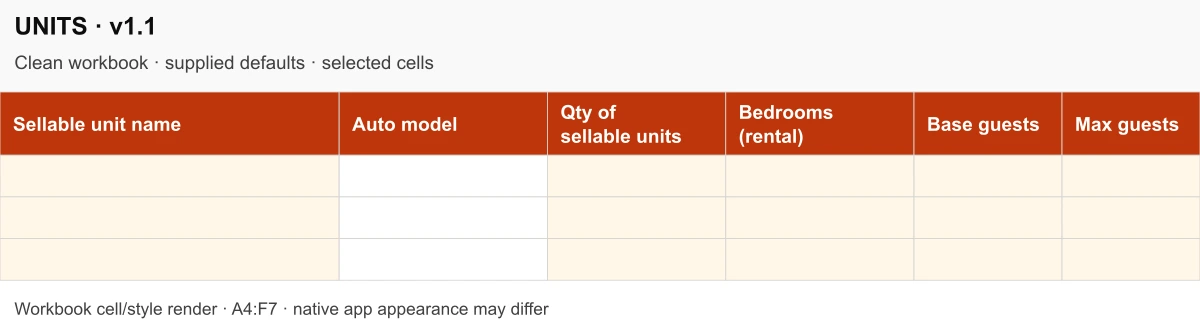
Record categories or whole properties, real quantities, bedrooms and guest limits. The supplied workbook starts with empty inventory rows.
Enlarge UNITS excerpt ↗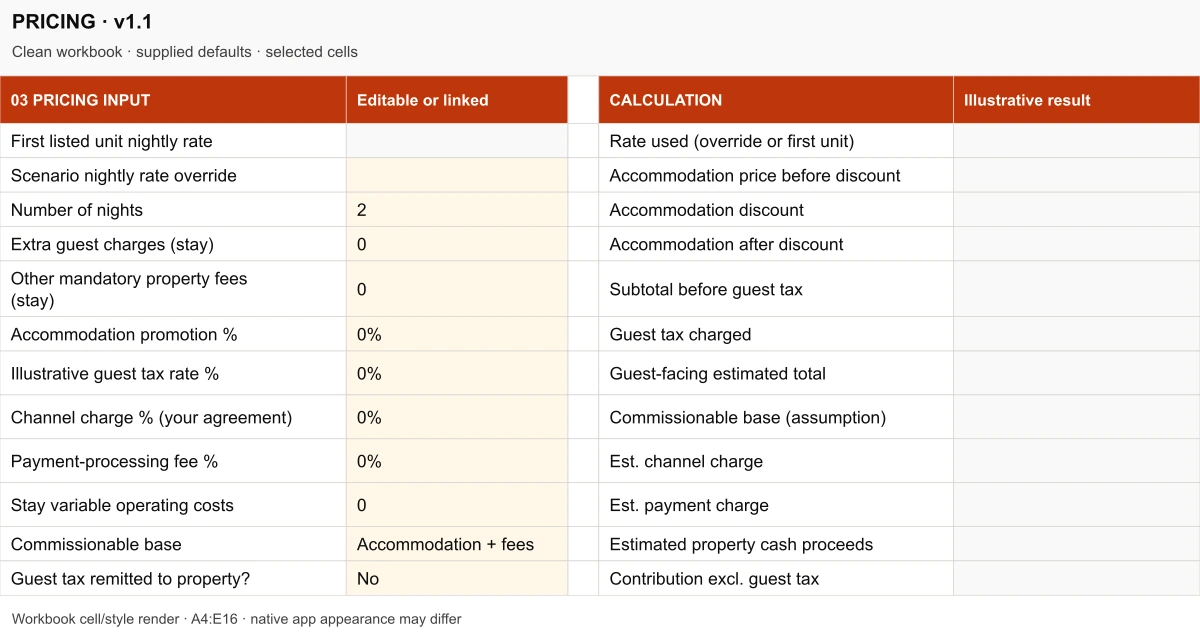
The nightly rate links from your first unit or a scenario override. Use actual contract assumptions; the blank workbook does not invent a payout.
Enlarge PRICING excerpt ↗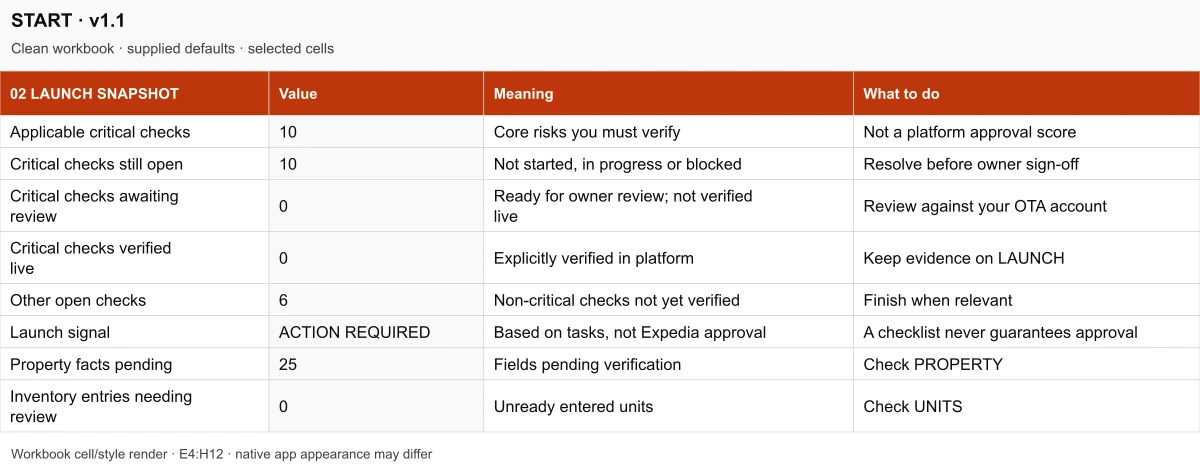
The delivered hotel default has 10 applicable critical checks, all open. ACTION REQUIRED is a working checklist signal, not an Expedia approval score.
Enlarge START · Launch snapshot excerpt ↗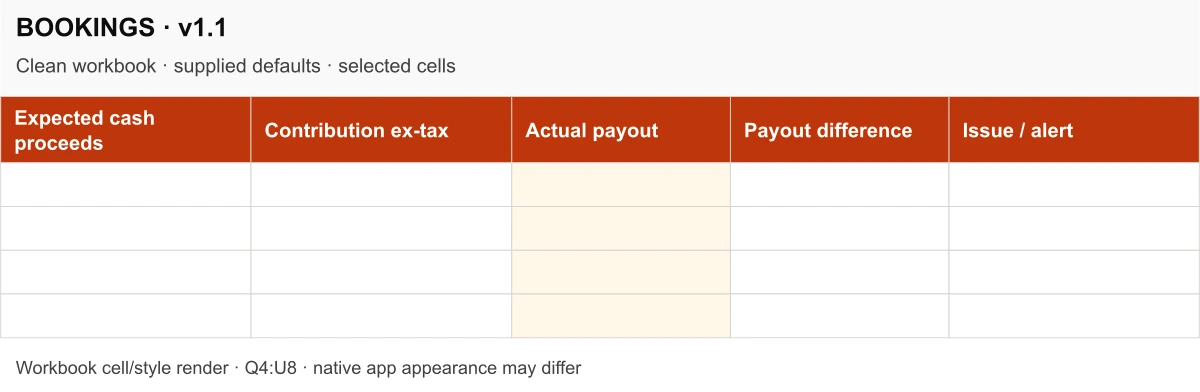
Enter reservation and financial records manually. Formula columns compare expected cash proceeds, contribution excluding tax, actual payout and differences.
Enlarge BOOKINGS excerpt ↗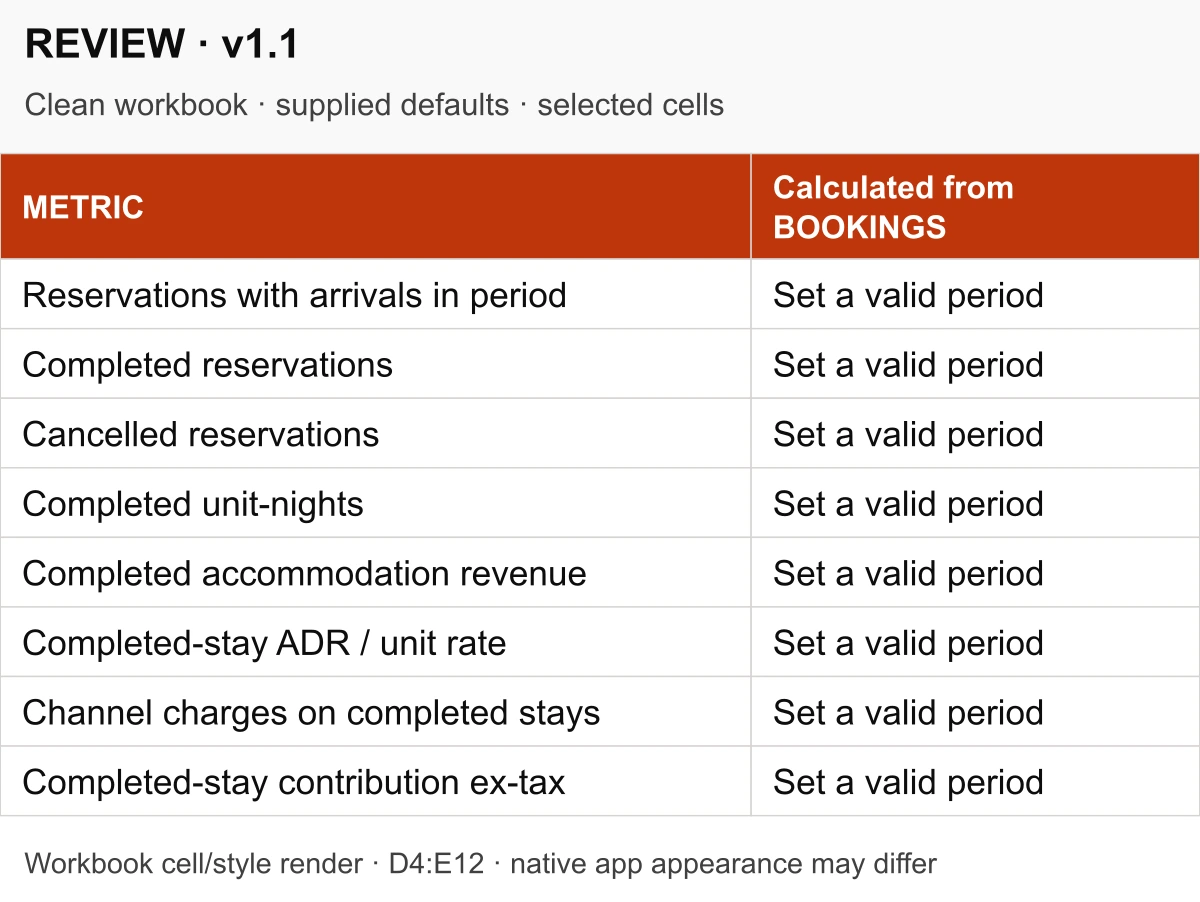
Set a valid review period and use your own booking records. Completed stays drive sold unit-nights, accommodation revenue and average daily rate.
Enlarge REVIEW excerpt ↗The complete workbook and guides are included in the paid download.
PRICING separates an estimated guest total, property cash proceeds and contribution before fixed costs. Enter your real rates, fee base, payment costs, tax handling and operating assumptions. Commission and collection arrangements differ; no universal Expedia or Vrbo percentage is assumed.
BOOKINGS compares manually entered financial records with received payouts. REVIEW uses check-in dates and completed stays for sold unit-nights, accommodation revenue and average daily rate (ADR). Cancelled stays do not inflate completed-stay revenue.
Exactly three files in the V1.1 customer ZIP. The workbook is your working record; the two PDFs explain how to begin and the scope of use.
Expedia_Launch_Operating_Workbook_v1_1.xlsx
13 worksheets covering property setup, inventory, content, photos, policies, pricing, launch verification, early operations, booking/payout records, review, examples and official sources.
START_HERE.pdf
Two pages explaining the setup sequence, hotel and whole-villa models, input colours, calculations, manual ledger and software limitations.
LICENSE_AND_SUPPORT.pdf
Single-business internal use, permitted staff copies, defect-reporting contact and the self-service product boundaries.
Download → set up → prepare → configure → verify → operate → review. Use a private working copy and complete only the tasks that apply to your property.
Download and extract the ZIP, read START_HERE.pdf and keep a clean backup. In START, choose your accommodation model, country and working currency.
Enter verified property information, sellable units and guest limits. Prepare listing text, photo coverage and policy entries; assign owners where needed.
Enter actual contract assumptions in PRICING. Manually configure your listing, rates, policies and availability in the appropriate partner dashboard.
Work through LAUNCH and retain evidence. Ready for owner review and Verified live are different states; only mark checks verified after checking the actual account.
Use the first-90-day tasks. Once bookings begin, manually record reservations, financial amounts and actual payouts in BOOKINGS.
Set review dates, check completed-stay results and payout issues, and record the next quarter’s priorities. Setup effort depends on the property and the information available.
The download is an Excel XLSX workbook and two PDF guides. No macros, scripts, API keys or paid add-ins are needed to use it. Suitable spreadsheet software and a PDF reader are needed; software licences are separate.
The workbook uses standard formulas and dropdowns. Representative calculations were checked for the release. Work on a computer, keep a clean backup and enter verified data in the pale orange input cells.
Platform setup, policy interpretation and financial decisions still require your own verification. Preserve calculated cells when editing.
Direct Google Sheets import and recalculation have not been independently tested. No native Google Sheets file is included. If importing, check formulas, dates, dropdowns and layout in a private copy before relying on results.
Google’s Excel-to-Sheets guidanceThe kit does not connect to Expedia or Vrbo, publish listings, update rates or availability, import reservations or payments, synchronise calendars, prevent double bookings or provide a tax rule engine. Currency is your working label; no foreign-exchange conversion is included.
The launch snapshot reflects checks you record. Verify the actual account and guest-facing listing before marking a task Verified live. Policy text differences are a cue for human review, not proof of an incorrect setting.
Self-service digital toolkit · V1.1
₹999INR · public Payhip price · one-time
Get the Expedia Launch KitContinue to Payhip for payment. The checkout names this product “SMH Expedia Launch Operating Kit V1.1”. Confirm your final currency, any applicable tax and the order total there.
One workbook and two PDF guides. No workbook subscription or Scale My Hotel enquiry is required. Platform charges, software licences and optional agency services are separate.
Single-business internal use, including staff copies and properties within your own business. No public uploading, redistribution, sublicensing or resale.
Report suspected defective files or broken formulas to hi@scalemyhotel.com. Personal onboarding, consultation and account management are separate.
Refund policy: All sales are final on digital downloads. Because files are delivered immediately upon completed transaction via Payhip, purchases are non-refundable. For technical access or unzipping assistance, contact support with your Payhip order receipt. No lifetime updates or support response time is promised.
Follow Payhip’s download instructions, extract the customer ZIP and read START_HERE.pdf before editing. Retain the clean workbook as a backup.
Refund policy · Site terms · Privacy policy. Technical delivery assistance is available via email.
An independent Scale My Hotel digital toolkit built around one 13-sheet Excel workbook and two PDF guides. It helps you organise property facts, prepare listing assets, estimate rates and channel proceeds, verify launch tasks and keep manual first-90-day booking records.
No. Scale My Hotel created this independent product. It is not affiliated with, endorsed, approved or certified by Expedia Group, Expedia, Hotels.com or Vrbo. Buying it does not provide a partner account or platform approval.
The workbook supports Room-based hotel and Whole-property rental models. A hotel category with 10 independently sellable rooms uses quantity 10. A six-bedroom villa sold exclusively to one group uses quantity 1. Confirm your actual property eligibility and inventory mapping with the relevant platform.
Expedia Group directs hotels and other lodging to Partner Central and vacation rentals to the Vrbo dashboard. Your accommodation model selects the suggested path in START. Property type, country, programme and account arrangements determine eligibility, functionality and brand distribution; one pathway does not guarantee visibility on every Expedia Group brand.
Yes. Record current facts, rates and policies, check the actual listing and assign corrections. Use OPERATE, BOOKINGS and REVIEW to structure ongoing checks. The workbook does not inspect or monitor your account automatically.
No. You enter information yourself. It does not publish listings, change rates or availability, import reservations or payments, send messages or synchronise calendars. It does not replace a property management system (PMS) or channel manager.
PRICING estimates a simplified scenario using the assumptions you enter. Actual commission bases, payment arrangements, taxes, promotions and refunds vary. In BOOKINGS, enter actual statement amounts and compare expected with received proceeds. Contribution excludes pass-through guest tax and selected variable costs; it is not full accounting profit or tax advice.
The delivered format is Excel XLSX with standard formulas and dropdowns. Representative calculations were checked for the release. Direct Google Sheets import and recalculation have not been independently tested; verify formulas, dates and dropdowns in a private copy before relying on it. A native Google Sheets file is not included.
No macros, scripts, API keys or paid add-ins are required for the workbook. You need suitable spreadsheet software and a PDF reader; software licences are not included. A computer is recommended for editing. Actual platform setup still requires the relevant authorised partner account.
Continue to Payhip using the purchase button. After successful payment, follow Payhip’s download instructions for the customer ZIP, extract its three files and read START_HERE.pdf before editing. Keep a clean backup. Opening checkout alone does not complete a purchase.
The licence permits staff copies and use for properties within the purchaser’s own business. Public uploading, redistribution, sublicensing and resale are prohibited. Report suspected file defects or broken formulas to hi@scalemyhotel.com. All sales are final on digital downloads; because files are delivered immediately upon payment confirmation via Payhip, purchases are non-refundable. Personal consulting and a support response-time commitment are not included.
No. You prepare, configure and verify your account yourself. Agency implementation is separately scoped. The kit does not guarantee approval, publication, distribution across brands, ranking, reservations, occupancy, revenue, profitability, regulatory compliance or a launch date.
Practical Digital Toolkits
Every kit is a self-service, one-time digital purchase built around practical spreadsheets and operational guides. Choose the right tool for your property stage and channel scope.
| Product & Best-Fit Buyer | Primary Operational Job | Property Stage | Platform Scope | Main Deliverables | Price & Details |
|---|---|---|---|---|---|
| For Operating Properties Hotel Growth Operating Workbook Operating independent hotels, boutique resorts & multi-room accommodation | Revenue planning, ADR/RevPAR tracking, OTA commission cost analysis, and monthly commercial review cadence | Active Operating Properties | Whole-business cross-channel (Direct, OTAs, Corporate, Offline) | 2 workbooks (blank + fictional example .xlsx) + start guide (.pdf + .html) + WhatsApp SOP + CSV reply library + 2 guides | ₹1,999 INR
View Kit |
| For New Openings Property Launch Operating Kit Owners, GMs & operators preparing a new property launch or major repositioning | Centralising property facts, room inventory, policies, rate architecture, photography brief & launch handover | Pre-Opening & Launch (0–90 days) | Cross-channel distribution foundation (Booking.com, MMT, Agoda, Expedia, Direct engine) | 15-tab master launch tracker (.xlsx) + 8-page Quick Start Guide (.pdf) + README.txt | ₹1,999 INR
View Kit |
| Booking.com Dedicated Booking.com Launch Operating Kit Hotels, villas & resorts setting up or re-optimising on Booking.com | Extranet setup, room types, cancellation policies, Opportunity Centre readiness & first-90-days routines | Channel Launch & Listing Tune-Up | Booking.com Extranet | 13-sheet clean master (.xlsx) + 2 worked examples (.xlsx) + Quick Start PDF + 11 guest messages (.txt) + licence PDF | ₹999 INR
View Kit |
| MakeMyTrip / IngoMMT MakeMyTrip Launch Operating Kit Indian independent hotels, homestays & resorts onboarding on MakeMyTrip + Goibibo | IngoMMT extranet onboarding, room category setup, meal plan mappings, seasonal rates & launch checks | Channel Launch & Listing Tune-Up | MakeMyTrip & Goibibo (IngoMMT Extranet) | 19-worksheet connected workbook (.xlsx) + 5-page Start Here PDF + 2-page Quick Reference PDF + VERSION.txt | ₹999 INR
View Kit |
| Villas & Vacation Rentals Airbnb Launch Operating Kit Villas, private vacation rentals, homestays & serviced apartment hosts | Whole-unit listing setup, photo captions, house rules, cleaner handover, message templates & 90-day host routine | Vacation Rental Launch & Host Onboarding | Airbnb (Whole-unit & private accommodations) | 19-tab launch tracker (.xlsx) + START_HERE.pdf + CLEANER_BRIEF.pdf + 10 in-workbook guest-message drafts | ₹999 INR
View Kit |
| Expedia Partner Central Current Page Expedia Launch Operating Kit Independent hotels & resorts listing on Expedia Partner Central for inbound reach | Partner Central onboarding, rate structures (Package, Member, Mobile), room setup & launch checks | Channel Launch & Listing Tune-Up | Expedia Group (Expedia, Hotels.com, Vrbo) | 13-worksheet connected workbook (.xlsx) + 2-page Start Here PDF + Licence & support guide PDF | ₹999 INR Viewing Now |
Operating independent hotels, boutique resorts & multi-room accommodation
Revenue planning, ADR/RevPAR tracking, OTA commission cost analysis, and monthly commercial review cadence
Active Operating Properties
Whole-business cross-channel (Direct, OTAs, Corporate, Offline)
2 workbooks (blank + fictional example .xlsx) + start guide (.pdf + .html) + WhatsApp SOP + CSV reply library + 2 guides
Owners, GMs & operators preparing a new property launch or major repositioning
Centralising property facts, room inventory, policies, rate architecture, photography brief & launch handover
Pre-Opening & Launch (0–90 days)
Cross-channel distribution foundation (Booking.com, MMT, Agoda, Expedia, Direct engine)
15-tab master launch tracker (.xlsx) + 8-page Quick Start Guide (.pdf) + README.txt
Hotels, villas & resorts setting up or re-optimising on Booking.com
Extranet setup, room types, cancellation policies, Opportunity Centre readiness & first-90-days routines
Channel Launch & Listing Tune-Up
Booking.com Extranet
13-sheet clean master (.xlsx) + 2 worked examples (.xlsx) + Quick Start PDF + 11 guest messages (.txt) + licence PDF
Indian independent hotels, homestays & resorts onboarding on MakeMyTrip + Goibibo
IngoMMT extranet onboarding, room category setup, meal plan mappings, seasonal rates & launch checks
Channel Launch & Listing Tune-Up
MakeMyTrip & Goibibo (IngoMMT Extranet)
19-worksheet connected workbook (.xlsx) + 5-page Start Here PDF + 2-page Quick Reference PDF + VERSION.txt
Villas, private vacation rentals, homestays & serviced apartment hosts
Whole-unit listing setup, photo captions, house rules, cleaner handover, message templates & 90-day host routine
Vacation Rental Launch & Host Onboarding
Airbnb (Whole-unit & private accommodations)
19-tab launch tracker (.xlsx) + START_HERE.pdf + CLEANER_BRIEF.pdf + 10 in-workbook guest-message drafts
Independent hotels & resorts listing on Expedia Partner Central for inbound reach
Partner Central onboarding, rate structures (Package, Member, Mobile), room setup & launch checks
Channel Launch & Listing Tune-Up
Expedia Group (Expedia, Hotels.com, Vrbo)
13-worksheet connected workbook (.xlsx) + 2-page Start Here PDF + Licence & support guide PDF
Need help choosing? For an operating property conducting monthly commercial reviews, choose the Hotel Growth Operating Workbook. For preparing an upcoming property opening across all channels, choose the Property Launch Operating Kit. For focused setup on a single platform, select the dedicated channel kit (Booking.com, MakeMyTrip, Airbnb, or Expedia).
Expedia Launch Operating Kit V1.1 · XLSX + two PDF guides · ₹999 INR
Explore separately scoped OTA listing and content optimisation if you want specialist setup or review. The kit does not require an agency engagement.
Preparing another channel? See the Booking.com kit or Airbnb kit. For a broader pre-opening brief, see the Property Launch Kit.
Scale My Hotel
Need help growing your hotel's direct bookings? Chat with us directly on WhatsApp.
Start WhatsApp ChatPrices and available services may vary by market. Final scope and pricing are confirmed before engagement.