Confirm reusable property facts
Record identity, location, amenities, guest rules and supporting evidence. Unknown and pending facts remain open rather than becoming approved copy.
Property Setup · Property Master
Property Launch Operating Kit · Commercial Preparation System
Enter property facts once. Organise saleable inventory, prepare listing content and photography, and see the decisions still holding up your handover before setting up your booking channels.
For first-time hotel owners, boutique resorts, villa hosts, homestays, guesthouses, serviced apartments and property investors.
₹1,999INR · one-time digital purchase
Get the Property Launch Operating KitOne connected workbook + Quick Start Guide · Digital download · No agency engagement required
See what’s insideExcel file · Import into your own Google Sheets · Best edited on desktop
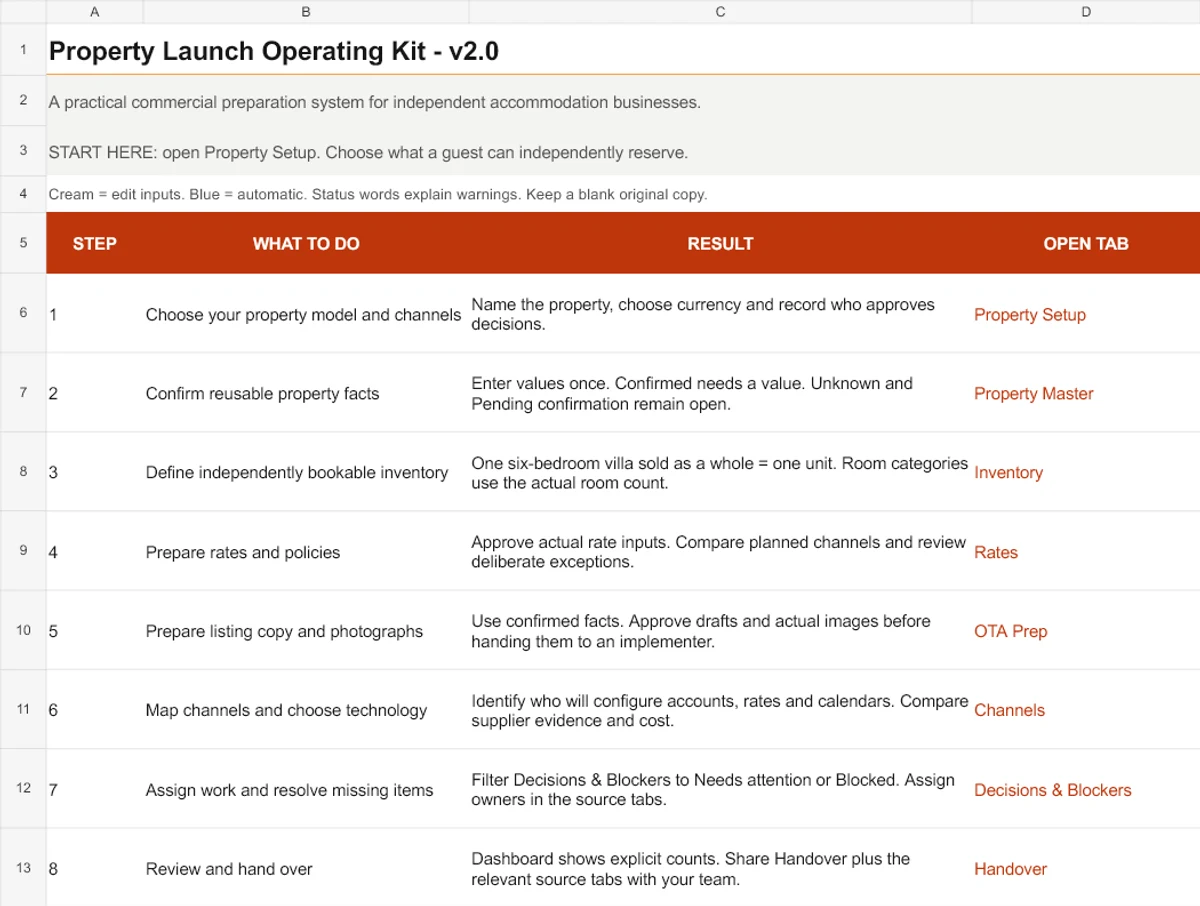
Before the first listing
When property details live across documents and WhatsApp messages, every OTA team and vendor asks again. Room counts, guest limits, rates and cancellation rules may tell different stories. The photographer needs a shot list; the implementer needs approved content; someone still needs to decide what is missing.
The kit connects that preparation in one editable workbook. You supply the facts and judgement. Linked views reuse confirmed information and keep unfinished decisions visible.
One connected preparation system
Work through the parts relevant to your property. The workbook connects the inputs to review and handover views.
Record identity, location, amenities, guest rules and supporting evidence. Unknown and pending facts remain open rather than becoming approved copy.
Property Setup · Property Master
Separate whole units from room categories. Names, physical counts and included occupancy feed the rate and channel preparation views.
Inventory · Rates · Channels
Enter your actual rate inputs and compare channel policy versions. Document deliberate differences; later changes can reopen an approval.
Rates · Policies
Use confirmed source facts to draft content for MakeMyTrip, Goibibo and your other planned channels. Track photo requirements, assets, rights and approval.
OTA Prep · Photography
Record technology requirements, candidate responses and cost evidence. Assign launch tasks, dependencies and completion evidence.
Technology · Launch Tasks
Follow source-tab links to resolve missing decisions. Review preparation counts, then share the handover summary and relevant working tabs.
Decisions & Blockers · Dashboard · Handover
A practical inventory distinction
A saleable unit is accommodation a guest can independently reserve. Counting physical bedrooms as separate bookings can misstate what you have available.
Illustrative example · Whole villa
6 bedrooms 1 unit
A six-bedroom villa rented as one entire property is one saleable unit. Record the bedrooms separately from the independently bookable count.
Illustrative example · Room-based hotel
8 + 6 + 2 16 units
Eight Deluxe rooms, six Standard rooms and two Suites are sixteen units when each room is independently bookable. Categories do not replace physical counts.
Independent mixed inventory: whole villas, cottages, apartments and room categories can be prepared together after confirming independence. If a whole-property offer overlaps with room-level offers, the workbook withholds the total. Distribution and overlap controls need separate configuration.
These are genuine crops of the blank master. Cream cells take inputs; blue cells update automatically. Open any preview to inspect it at a larger size. No customer results or fictional performance figures are shown.
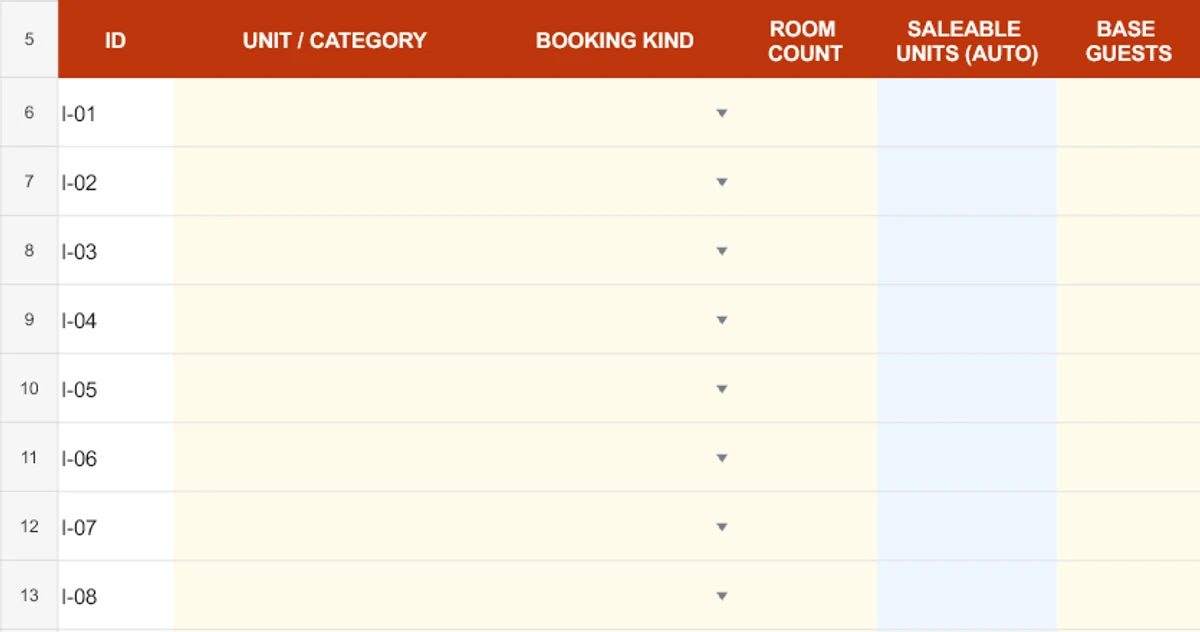
Cream cells take your unit or room-category inputs. The blue saleable-unit column calculates from the booking model; bedrooms are a separate physical detail.
Enlarge Inventory preview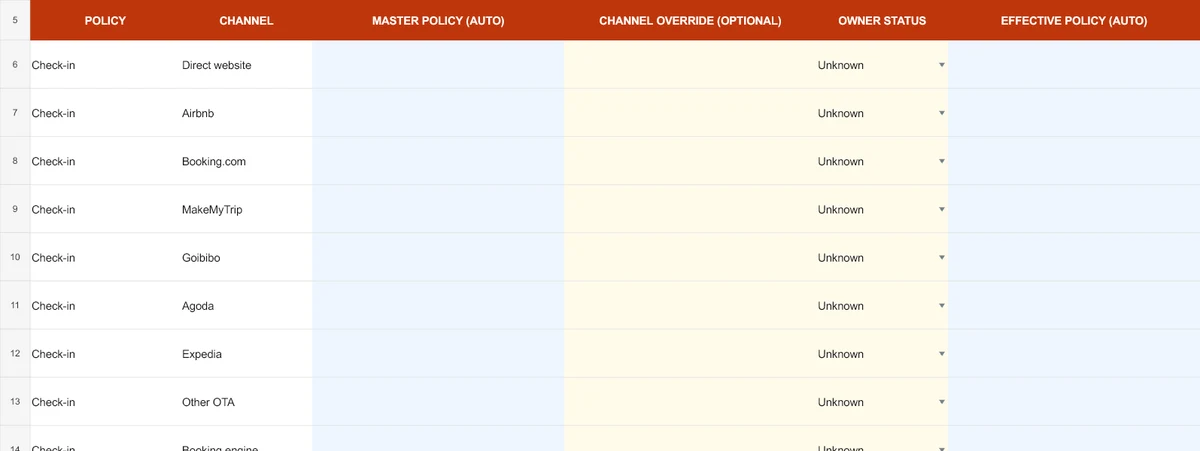
Confirmed master policies feed channel rows. Enter an override only when needed. Further columns record exceptions and approval copies so changes can reopen review.
Enlarge Policies preview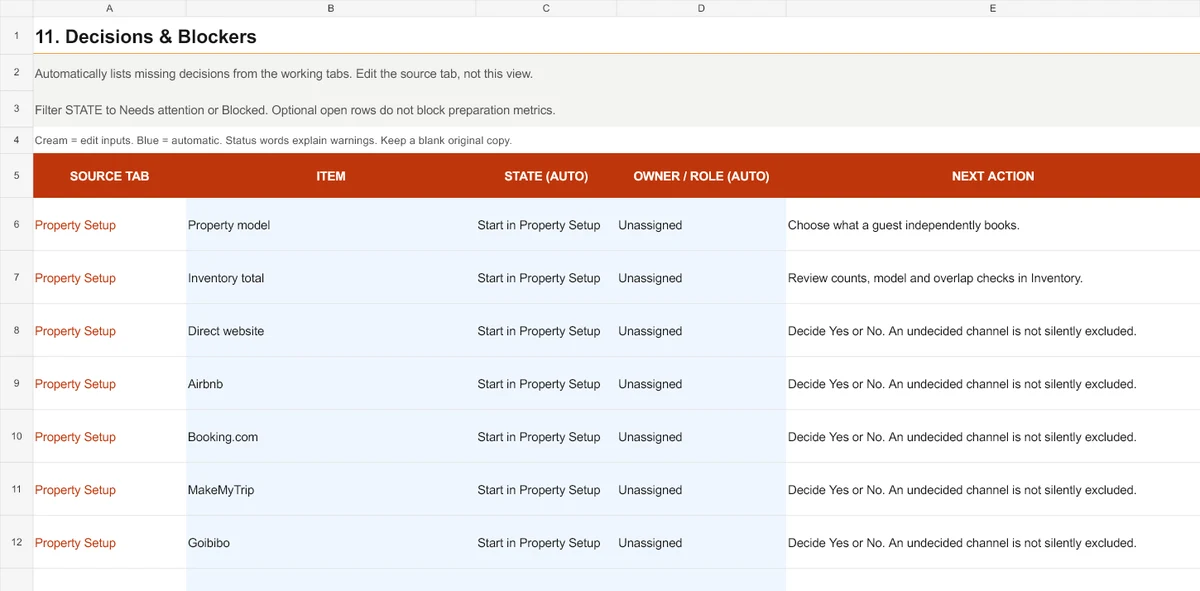
This automatic view lists source tabs, unresolved items, responsible roles and next actions. Resolve the source input instead of editing the generated list.
Enlarge Decisions & Blockers preview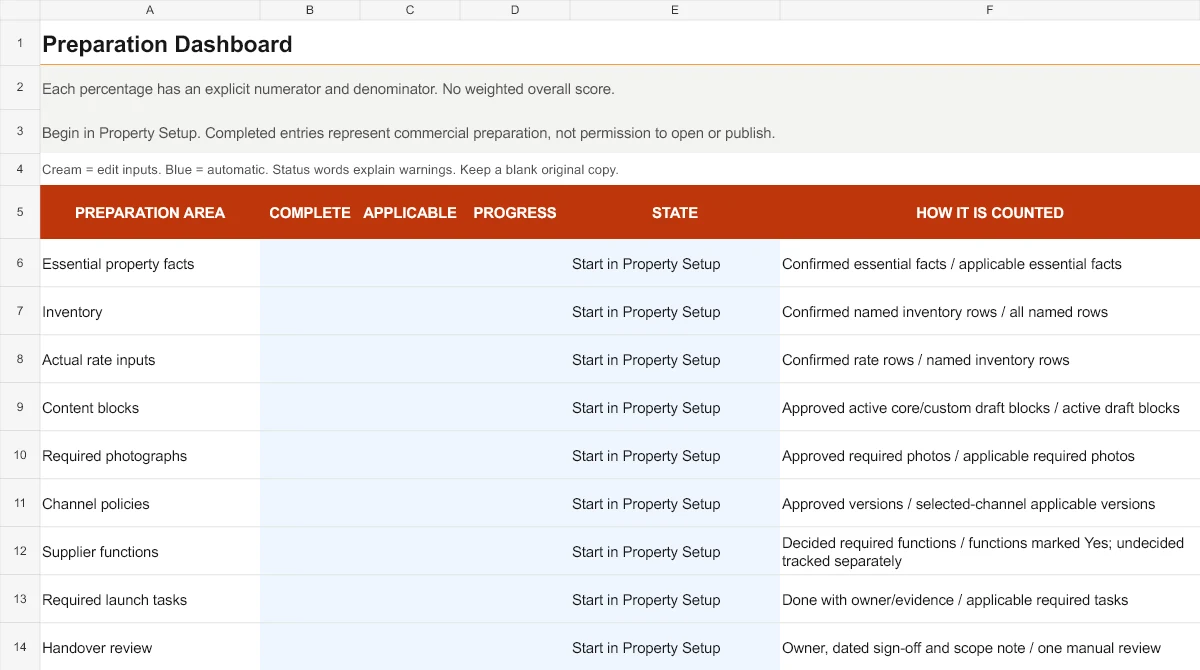
Each workstream shows complete and applicable counts. Progress describes preparation; it does not certify platform approval or permission to open.
Enlarge Dashboard preview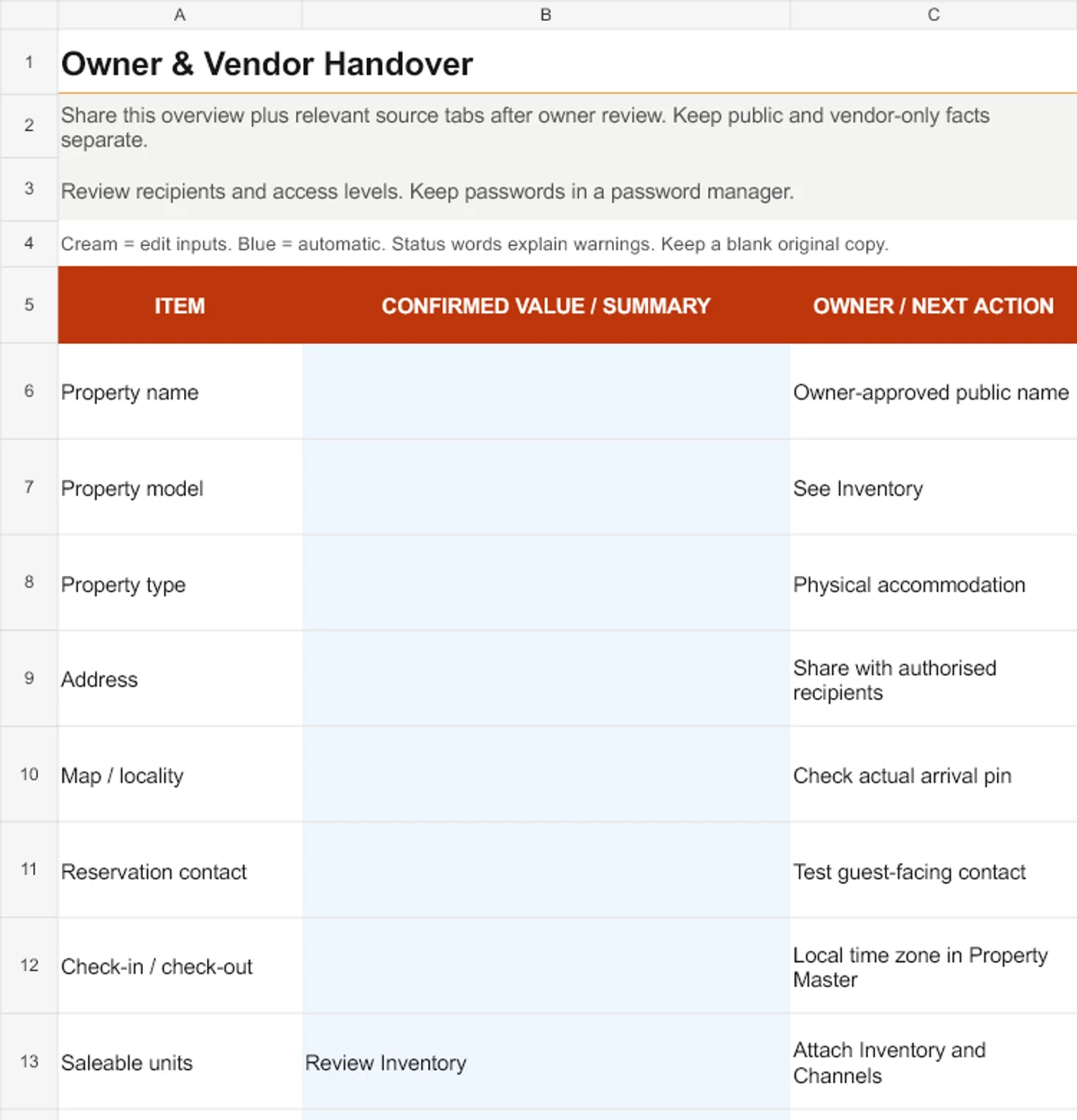
Review confirmed values, owners and next actions. Share this summary with the relevant source tabs after reviewing recipient access; it is not an automatic OTA submission.
Enlarge Handover previewCrops show selected columns and rows, not every field. Spreadsheet appearance and protection can change after Google Sheets import.
One customer ZIP with three files. You create and maintain your own working copy.
One editable blank master containing the property preparation, decision review and handover system.
Opening, copying and importing instructions, the preparation workflow, approval guidance and safe file use.
Where to start, Excel and Google Sheets steps, input-cell conventions, working limits and the file-use contact.
Keep the blank original for recovery. Use one property per working copy.
Read the Quick Start PDF. Keep the blank master untouched and create a working copy for one property.
Choose whole-property, room-based or independent mixed inventory in Property Setup, then select your planned channels.
Complete Property Master. Record evidence and distinguish confirmed facts from information still awaiting a decision.
Work through Inventory, Rates, Policies, OTA Prep and Photography. Record actual decisions and approval copies.
Use Decisions & Blockers to return to unresolved source inputs. Check the Dashboard’s complete and applicable counts.
Confirm responsible roles and sign-off. Brief your team or vendors using Handover and the relevant source tabs.
No macros, Apps Script or paid spreadsheet add-ons are required. Use a desktop for the wider preparation tables.
Open the XLSX and use Save As to make a working copy. Enable automatic calculation. Cream cells are inputs; blue calculation cells are protected in the supplied file.
Designed for Excel. Full desktop open, edit, filter, protection and print acceptance is still unverified in the supplied release.
Upload to your own Google Drive, open with Sheets and choose File → Save as Google Sheets if needed. Make a copy before entering facts. Review formula protection through Data → Protect sheets and ranges.
The supplied release report records native conversion and scenario checks. Full native protection, filter and print interaction remains unverified. No Scale My Hotel Drive access is required.
These are row capacities, not a 24-room hotel limit. Do not insert, delete, rearrange or sort source rows. More complex inventories or structural changes require spreadsheet maintenance outside normal kit use.
It suits owners and operators preparing a new commercial setup, or tidying incomplete information before adding booking platforms.
Property Launch Operating Kit · V2
One connected XLSX workbook, an eight-page PDF and opening instructions. A one-time digital purchase; implementation is separate.
₹1,999INR · current Payhip price · one-time
Get the Property Launch Operating KitContinue to Payhip. Review the charged currency, any applicable tax and the final order total there.
Use desktop Excel or your own converted Google Sheet. Check the prepared row limits and product boundaries above.
The single-purchaser licence permits adaptation across properties within your own business. Refund policy: All sales are final on digital downloads; because files are delivered immediately upon completed transaction via Payhip, purchases are non-refundable. For technical unzipping or delivery assistance, contact support with your Payhip order reference. No lifetime updates or unlimited support are promised.
Payhip handles checkout and file delivery. The intended download is SMH_Property_Launch_Operating_Kit_V2.zip. Extract it, read the Quick Start Guide and retain the blank master.
Review our Refund Policy and Terms of Service. Consulting terms do not govern this self-service download.
It is a self-service digital product by Scale My Hotel for commercial launch preparation. One connected workbook helps independent accommodation owners organise facts, inventory, rates, policies, content, supplier decisions and handover. You enter and approve the information; it does not launch the property for you.
Yes. A villa rented as one entire property is one saleable unit, even if it has six bedrooms. Record bedrooms separately. Do not enter six independently bookable rooms unless guests can actually reserve them separately without overlap.
Room-based properties use actual counts for independently bookable room categories. Independent whole units and independent mixed inventory also have preparation rules. Overlapping whole-property and room-level offers need configuration outside this workbook; unresolved overlap withholds the unit total.
Upload the XLSX into your own Google Drive, open with Google Sheets and choose File → Save as Google Sheets if it remains in Excel editing mode. Make a working copy and review protection for formula ranges after import. The supplied release report records native conversion and scenario checks; full protection, filter and print interaction is still unverified.
The download includes an XLSX workbook designed for Excel. Use Save As to create a working copy and enable automatic calculation. It requires no macros, Apps Script or paid spreadsheet add-ons. Full desktop Excel open, edit, protection, filtering and print acceptance remains unverified in the supplied release.
You should be comfortable entering values, choosing dropdowns and making a copy. The guide explains cream input cells, blue automatic cells, written statuses and values-only approval copies. Use the prepared spare rows; inserting, deleting, rearranging or sorting source rows is unsupported. Desktop editing is recommended.
The V2 customer ZIP contains one connected XLSX master workbook, an eight-page Quick Start PDF and README.txt opening instructions. You download files and create your own working copy; no Google Sheets account or live application is provisioned.
Each workbook copy represents one property. Multi-property usage rights depend on the approved licence supplied with the purchase. Confirm those terms before buying; one workbook’s technical capacity does not establish a licence for other businesses or client properties.
No. It prepares information for MakeMyTrip, Goibibo, Airbnb, Booking.com and other channels you select. Listings, approvals, live availability, reservations, payments and system connections must be configured and tested separately.
No. You enter your own actual rate inputs and approval decisions. Optional gross-scenario arithmetic uses your assumptions; it does not access private market rates, recommend optimal selling prices or provide a complete revenue forecast.
Handover is designed to help brief owners and implementers using the summary and relevant source tabs. Permitted sharing is governed by the approved usage licence. Confirm team and vendor permissions before purchase and review access before sharing property information.
No. This is a one-time DIY digital purchase. Agency implementation, property-specific advice, OTA configuration and custom spreadsheet work are separate services. No agency engagement is required to work through the kit.
No. Preparation counts do not establish property eligibility or regulatory readiness. Verify platform, licensing, tax, safety and operational requirements for your actual property and jurisdiction. Launch timelines, occupancy and income are not guaranteed.
Read README.txt and the Quick Start Guide first. For unzipping or delivery issues, contact hi@scalemyhotel.com with your Payhip order reference for technical support. All sales are final on digital downloads; because files are delivered immediately upon payment confirmation, purchases are non-refundable. No unlimited support, response-time guarantee or future-update entitlement is promised here.
Scale My Hotel offers a separate Rocket Launch Package for new hotels and short-term rental launch setup. Scope and pricing are agreed separately. The kit provides independent DIY value and does not require an agency engagement.
For a focused first check, use the free listing photo checklist or read the villa and homestay booking software guide. Looking for vacation rental marketing tactics? Browse our free Airbnb & Rental Marketing Ideas. Already operating and reviewing commercial performance? See the separate Hotel Growth Operating Workbook.
Practical Digital Toolkits
Every kit is a self-service, one-time digital purchase built around practical spreadsheets and operational guides. Choose the right tool for your property stage and channel scope.
| Product & Best-Fit Buyer | Primary Operational Job | Property Stage | Platform Scope | Main Deliverables | Price & Details |
|---|---|---|---|---|---|
| For Operating Properties Hotel Growth Operating Workbook Operating independent hotels, boutique resorts & multi-room accommodation | Revenue planning, ADR/RevPAR tracking, OTA commission cost analysis, and monthly commercial review cadence | Active Operating Properties | Whole-business cross-channel (Direct, OTAs, Corporate, Offline) | 2 workbooks (blank + fictional example .xlsx) + start guide (.pdf + .html) + WhatsApp SOP + CSV reply library + 2 guides | ₹1,999 INR
View Kit |
| For New Openings Current Page Property Launch Operating Kit Owners, GMs & operators preparing a new property launch or major repositioning | Centralising property facts, room inventory, policies, rate architecture, photography brief & launch handover | Pre-Opening & Launch (0–90 days) | Cross-channel distribution foundation (Booking.com, MMT, Agoda, Expedia, Direct engine) | 15-tab master launch tracker (.xlsx) + 8-page Quick Start Guide (.pdf) + README.txt | ₹1,999 INR Viewing Now |
| Booking.com Dedicated Booking.com Launch Operating Kit Hotels, villas & resorts setting up or re-optimising on Booking.com | Extranet setup, room types, cancellation policies, Opportunity Centre readiness & first-90-days routines | Channel Launch & Listing Tune-Up | Booking.com Extranet | 13-sheet clean master (.xlsx) + 2 worked examples (.xlsx) + Quick Start PDF + 11 guest messages (.txt) + licence PDF | ₹999 INR
View Kit |
| MakeMyTrip / IngoMMT MakeMyTrip Launch Operating Kit Indian independent hotels, homestays & resorts onboarding on MakeMyTrip + Goibibo | IngoMMT extranet onboarding, room category setup, meal plan mappings, seasonal rates & launch checks | Channel Launch & Listing Tune-Up | MakeMyTrip & Goibibo (IngoMMT Extranet) | 19-worksheet connected workbook (.xlsx) + 5-page Start Here PDF + 2-page Quick Reference PDF + VERSION.txt | ₹999 INR
View Kit |
| Villas & Vacation Rentals Airbnb Launch Operating Kit Villas, private vacation rentals, homestays & serviced apartment hosts | Whole-unit listing setup, photo captions, house rules, cleaner handover, message templates & 90-day host routine | Vacation Rental Launch & Host Onboarding | Airbnb (Whole-unit & private accommodations) | 19-tab launch tracker (.xlsx) + START_HERE.pdf + CLEANER_BRIEF.pdf + 10 in-workbook guest-message drafts | ₹999 INR
View Kit |
| Expedia Partner Central Expedia Launch Operating Kit Independent hotels & resorts listing on Expedia Partner Central for inbound reach | Partner Central onboarding, rate structures (Package, Member, Mobile), room setup & launch checks | Channel Launch & Listing Tune-Up | Expedia Group (Expedia, Hotels.com, Vrbo) | 13-worksheet connected workbook (.xlsx) + 2-page Start Here PDF + Licence & support guide PDF | ₹999 INR
View Kit |
Operating independent hotels, boutique resorts & multi-room accommodation
Revenue planning, ADR/RevPAR tracking, OTA commission cost analysis, and monthly commercial review cadence
Active Operating Properties
Whole-business cross-channel (Direct, OTAs, Corporate, Offline)
2 workbooks (blank + fictional example .xlsx) + start guide (.pdf + .html) + WhatsApp SOP + CSV reply library + 2 guides
Owners, GMs & operators preparing a new property launch or major repositioning
Centralising property facts, room inventory, policies, rate architecture, photography brief & launch handover
Pre-Opening & Launch (0–90 days)
Cross-channel distribution foundation (Booking.com, MMT, Agoda, Expedia, Direct engine)
15-tab master launch tracker (.xlsx) + 8-page Quick Start Guide (.pdf) + README.txt
Hotels, villas & resorts setting up or re-optimising on Booking.com
Extranet setup, room types, cancellation policies, Opportunity Centre readiness & first-90-days routines
Channel Launch & Listing Tune-Up
Booking.com Extranet
13-sheet clean master (.xlsx) + 2 worked examples (.xlsx) + Quick Start PDF + 11 guest messages (.txt) + licence PDF
Indian independent hotels, homestays & resorts onboarding on MakeMyTrip + Goibibo
IngoMMT extranet onboarding, room category setup, meal plan mappings, seasonal rates & launch checks
Channel Launch & Listing Tune-Up
MakeMyTrip & Goibibo (IngoMMT Extranet)
19-worksheet connected workbook (.xlsx) + 5-page Start Here PDF + 2-page Quick Reference PDF + VERSION.txt
Villas, private vacation rentals, homestays & serviced apartment hosts
Whole-unit listing setup, photo captions, house rules, cleaner handover, message templates & 90-day host routine
Vacation Rental Launch & Host Onboarding
Airbnb (Whole-unit & private accommodations)
19-tab launch tracker (.xlsx) + START_HERE.pdf + CLEANER_BRIEF.pdf + 10 in-workbook guest-message drafts
Independent hotels & resorts listing on Expedia Partner Central for inbound reach
Partner Central onboarding, rate structures (Package, Member, Mobile), room setup & launch checks
Channel Launch & Listing Tune-Up
Expedia Group (Expedia, Hotels.com, Vrbo)
13-worksheet connected workbook (.xlsx) + 2-page Start Here PDF + Licence & support guide PDF
Need help choosing? For an operating property conducting monthly commercial reviews, choose the Hotel Growth Operating Workbook. For preparing an upcoming property opening across all channels, choose the Property Launch Operating Kit. For focused setup on a single platform, select the dedicated channel kit (Booking.com, MakeMyTrip, Airbnb, or Expedia).
For Booking.com-focused preparation, rate scenarios and first-90-day reviews, see the separate Booking.com Launch & 90-Day Operating Kit.
Preparing Expedia Group distribution? The separate Expedia Launch Operating Kit covers hotel or whole-property preparation, launch checks and manual booking/payout records.
One property brief. Visible decisions. A structured handover.
Get the kit on PayhipScale My Hotel
Need help growing your hotel's direct bookings? Chat with us directly on WhatsApp.
Start WhatsApp ChatPrices and available services may vary by market. Final scope and pricing are confirmed before engagement.